
4-Participant
October 4, 2024
Solved

Creo 8 - Using sheet metal offset wall to create new part

  • October 4, 2024
  • 1 reply
  • 1603 views

I have a standard sheet metal part which I have formed, which I need to create matching wall 10mm offset from it to maintain a continuous section, (think of HVAC square ducting etc)


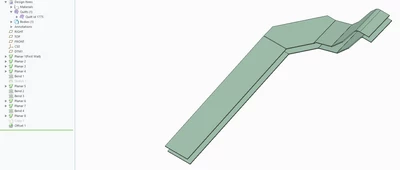
I've managed to do this with a quilt and offset wall, the geometry I want is there, but I need this formed as a separate part.


In the image the lower side is the original sheet metal part.
 

PR_12058649_0-1728041647906.png


Thanks in advance!


Best answer by tbraxton

Creo 7 introduced multibody modeling, so you have the option to use some of the tools in Creo 8 (full implementation for sheet metal is in Creo 11). Create your offset wall as a separate body and then save that body to a part. You can then convert this new part to sheet metal from solid. The new part will be driven by the geometry that you referenced for offset.


About Multiple Bodies in Sheetmetal Design (ptc.com)


You mention rectangular ductwork, is the rectangle made by welding multiple pieces? I ask as that could affect how you model and control the design.

1 reply

tbraxton
22-Sapphire II
tbraxton22-Sapphire IIAnswer
22-Sapphire II
October 4, 2024

Creo 7 introduced multibody modeling, so you have the option to use some of the tools in Creo 8 (full implementation for sheet metal is in Creo 11). Create your offset wall as a separate body and then save that body to a part. You can then convert this new part to sheet metal from solid. The new part will be driven by the geometry that you referenced for offset.


About Multiple Bodies in Sheetmetal Design (ptc.com)


You mention rectangular ductwork, is the rectangle made by welding multiple pieces? I ask as that could affect how you model and control the design.

4-Participant
October 4, 2024

Thanks, it wont be a welded part no, eventually I will model walls to enclose it with separate features required.


I will try to create the new body, is this possible within the sheetmetal design in Creo 8 or shall I convert to solid? 


Cheers

tbraxton
22-Sapphire II
22-Sapphire II
October 4, 2024

If you are designing an enclosed duct, then I would suggest that you model the duct in part mode to get the required geometry and then convert it to a sheet metal part when you have the full geometry as a solid part. I would use surface modeling to create the inner duct surfaces and then offset that to the desired thickness (assuming it is all made from the same gage sheet). You can build the geometry faster in part mode rather than sheet metal mode.
