
1-Visitor
January 2, 2019
Question

Creo drawing type keeps switching from assembly to part

  • January 2, 2019
  • 1 reply
  • 1915 views

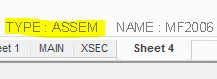
When working on drawings I've noticed that the drawing type keeps switching from assembly (what I've set it as) to part seemingly randomly. Anyone know why this might happen? I've attached a picture showing the setting I'm talking about.
 

drawing type.PNG

1 reply

StephenW
23-Emerald III
January 2, 2019

Anytime you have multiple models on a drawing and you switch to a different sheet, Creo will change the active model (which is what this "type" is referring) to what ever it considers the default model for that sheet.  In general I think it's the first model view added when that sheet was created but I'm not sure if that is really the case.

Usually I don't worry too much about what the active model is when I am working on a drawing with mulitple models. 

nlambe21-VisitorAuthor
1-Visitor
January 2, 2019

Thanks for the reply! When I first created the drawing the type was a part.  I then switched it to an assembly and now anytime I go to a different drawing and come back it switches to part again.

StephenW
23-Emerald III
January 3, 2019

You still have multiple models (maybe just one part and one assembly) in your drawing.

If you do not need the part detailed in the drawing anymore, go to the LAYOUT tab, then DRAWING MODELS then DEL MODEL and select the model you don't wish to have in the drawing anymore.