
1-Visitor
February 19, 2015
Solved

Creo goes to not responding mode after click on Table menu

  • February 19, 2015
  • 3 replies
  • 10306 views

The CAD data is saved on shared drive.

When we open the drawings and click on Table Menu, it shows the spinning logo initially and creo goes in not responding mode for around 20-30 min. I am using the Creo 2 M120. I have tested this issue with M070 and it shows the same behavior. This happens on Dell and HP hardware.


Any idea or suggestion will be helpful.


Thanks in Advance.
Best answer by Devidas

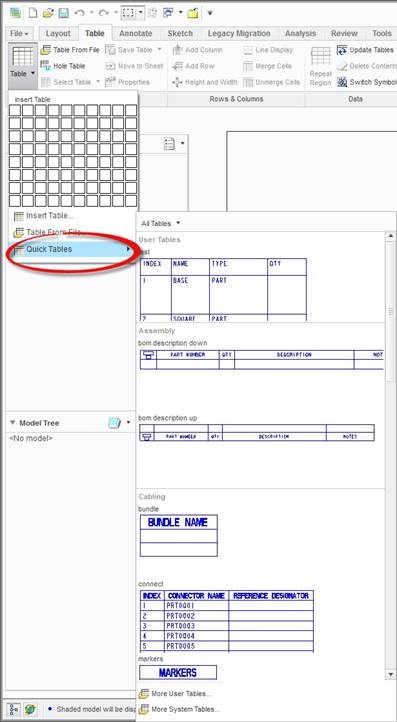
In Creo Parametric 1.0, when the ribbon and tabs were introduced, PTC introduced the cascade gallery for Table > Quick Tables. The gallery shows a preview of the tables in the pro_table_dir, along with previews of recently used tables, system table etc., making it easier for the user to choose which table (s)he wants to insert in the drawing.

As out of the box there is no value set for pro_table_dir option in config.pro file, so its look into working directory which having around 16k files in our case. This is the reason Creo goes to not responding mode after click on table menu and takes around 10-30 min time to get it back.

The workaround on this issue is set the empty folder/directory for this option so Creo will not search the Working directory.

Table.jpg

3 replies

17-Peridot
February 19, 2015

Create a support case.

1-Visitor
February 19, 2015

I worked at a place like that where the computer would flake out for 25 minutes on a save. I figured it was a bad network issue with Windchill, but they had no support contract, and didn't care that I was losing that much time. It wasn't even consistent. Most saves were 10 seconds, but every so often, soaking up a few hours each day - nada. I would preemptively disconnect the Windchill link and that worked, but made using Windchill sort of difficult.

Fire up task manager or Process Explorer to see what the computer is busy with when it flakes. If the CPU is idle and no memory is being allocated, it's probably a network problem; this assumes Creo comes back and hasn't simply stalled and stopped. It's possible it is paging itself to death and you need more RAM, or it's waiting for a network connection - lots of possible areas.

Devidas1-VisitorAuthor
1-Visitor
February 19, 2015

we are not using Windchill in this case, all data get saved to network drive.

I have opened a case with PTC but they says it may be network related issue. I am not completely agree with that as issue is with test system located in same LAN network of share.

Also it goes not responding mode only after click on table menu and not others.

1-Visitor
February 19, 2015

The only option is to debug the problem. There isn't a delay-table setting.

1) Does this happen on freshly created drawings?

2) Do the drawings have associated models?

3) Are the tables Repeat regions?

4) Does this happen if you do a back-up of the drawing to a local drive and retrieve from the new location?

5) What does Process Monitor show is happening?

6) Were these drawings made with an older version of Creo/ProE and are just now being opened?

7) Was Creo put on the computer as a clean install? People doing manual copying miss parts and this produces weird results

😎 Is Creo installed locally?

9) Is the license manager installed locally?

10) Is this the same on all the computers or is this only tested on one computer?

Devidas1-VisitorAuthorAnswer
1-Visitor
March 20, 2015

In Creo Parametric 1.0, when the ribbon and tabs were introduced, PTC introduced the cascade gallery for Table > Quick Tables. The gallery shows a preview of the tables in the pro_table_dir, along with previews of recently used tables, system table etc., making it easier for the user to choose which table (s)he wants to insert in the drawing.

As out of the box there is no value set for pro_table_dir option in config.pro file, so its look into working directory which having around 16k files in our case. This is the reason Creo goes to not responding mode after click on table menu and takes around 10-30 min time to get it back.

The workaround on this issue is set the empty folder/directory for this option so Creo will not search the Working directory.

Table.jpg

1-Visitor
March 20, 2015

Where was the working directory?

Devidas1-VisitorAuthor
1-Visitor
March 20, 2015

Working directory is set as Shared folder and which having the 16k Files.