

Creo Parametric drawing BOM- how to mix the real assemblies and Phantom assemblies.
Hi,
When I was working with Solidworks, there were options in sub-assemblies to show, hide or promote the components under it. When the option is set to "promote", all components in this sub assemblies were shown in the drawing BOM in the upper assembly drawing. If it was set to "Hide", then the sub-assembly was treated like a part in upper level assembly drawing BOM. It is a common practice to gather parts together so they can be used as a group.
It seems there is no easy way to do it in Creo. I made a parameter called "SYSTEM_TYPE" and set the value to "Phantom_Assy", then tried to use 2 repeat regions and use filter to include and exclude parts with this value. But I couldn't make it work. Has anyone tried and success?
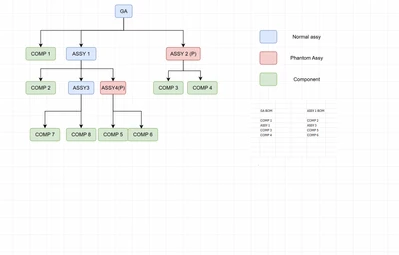
I attach a diagram here showing what I am looking for. The BOM in GA drawing should contain comp1, Assy1. Comp3 and Comp4. Assy2 is a phantom assembly and doesn't show in the BOM.
Thanks for the help