3-Newcomer
April 29, 2025
Solved

creo parametric framework- new profile creation and profile visualization issue

  • April 29, 2025
  • 3 replies
  • 692 views
 

Q1 how to create new profile in creo 8 and saved to libraries?

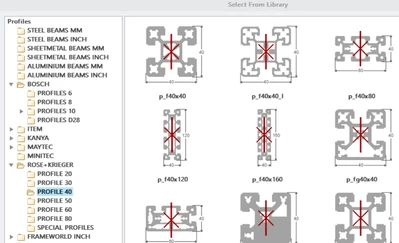
Q2 I had selected rose krieger profile and Bosh profile but in creo, It showed as a rectangular tube with hole in it. how to get the actual visualization? why is that happening?
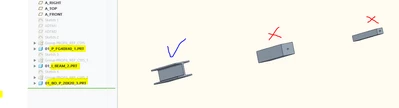
 

HC_9153653_0-1745937792082.png

HC_9153653_3-1745938116479.png


Best answer by aputman

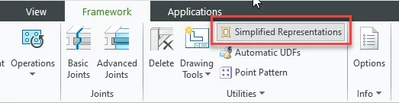
For Q2....

aputman_0-1745942954527.png

I don't know the answer to Q1. 

3 replies

aputman13-AquamarineAnswer
13-Aquamarine
April 29, 2025

For Q2....

aputman_0-1745942954527.png

I don't know the answer to Q1. 

13-Aquamarine
April 29, 2025

For Q1, there may be some useful information here.

6-Contributor
January 20, 2026

Q1 - The simplest way to make a "new" profile is to copy an existing one and modify it. The relations and parameters are fairly heavy duty and it's a nightmare trying to make new pieces work with the functionality of AFX. I recommend not deleting or adding any new dimensions (reference dims and relations are OK), but you can modify them. 
I was able to do this to the 8020-inch T-Slot and make some *very close* series 30 and 40 versions (metric). 
 (attached)


You can unzip this somewhere local and route to this location to "extend" your selection list through the AFX Advanced settings.
Personally, I saved mine here:
C:\Users\"username*\Documents\AFX SETTINGS\customization\parts\profiles
(mimicking the folder structure of the OG install)
Then route to here thru AFX Options:
C:\Users\*username*\Documents\AFX SETTINGS\customization

Close and reopen Creo and it should stick.


I picked the closest versions of these and just modified the dimensions (and parameters to correct the names)