
16-Pearl
November 23, 2016
Question

Creo Simulate pin constraint problem

  • November 23, 2016
  • 2 replies
  • 4497 views

Hi,

Maybe someone can help me understand this:

I've tried recently to simulate a click effect on a custom-built connector and had problem with Creo Simulate.

This is simple assembly just to show the problem.

One part is  constrained with pin constraint but  when viewing simulate results it seems not to turn but tries to return to start position like on a spring.

Pushing part just turns it a little and then slides below it. First i thought friction is the problem but its not.

Am I not understanding what pin constraint in Simulate actually does?
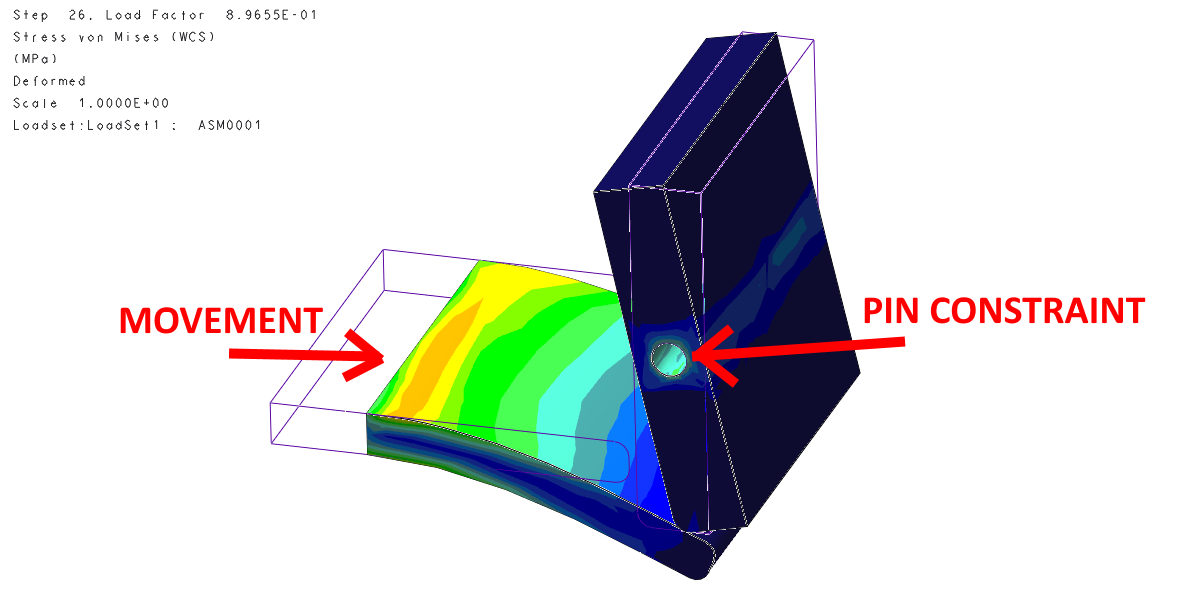
1.png

Attached are avi of simulate result and assembly.

2 replies

1-Visitor
November 23, 2016

Perhaps you're running LDA(large deformation analysis)!

16-Pearl
November 23, 2016

Yes, but without large deformations I can`t use finite friction. And when I don`t use large deformations without friction I still get similar result.

1-Visitor
November 24, 2016

The large deformation analysis is the very real deformation,that's right!  Another reason for this result is the load you use(grav)!

13-Aquamarine
November 24, 2016

We've seen other issues to do with large rotations and LDA (Enforced displacement, tangential direction, more than 1 revolution).

Just to see what happens, try creating a point at the centre of your pin; creating a rigid link from the hole bore to the point; and constraining the point in all translations and two rotations - just leaving the rotation about the hole axis free.