
10-Marble
April 20, 2021
Question

Creo7, pick feature on screen and only shows in model tree under bodies? - NO!

  • April 20, 2021
  • 1 reply
  • 3639 views

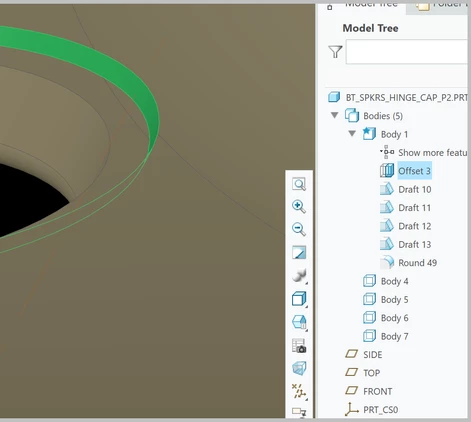
Why when you pick a feature in a part on the screen it only highlights the feature in the model tree under bodies???  This is dumb and should be changed to highlight the feature in tree in its location, not under bodies.


PLEASE FIX A.S.A.P.  It is better to know where it lies in the tree structure, not the body.
korr_0-1618937599734.png


1 reply

tbraxton
22-Sapphire II
22-Sapphire II
April 20, 2021

If you are asking for an enhancement, your information provided is not sufficient to evaluate on merit. There is also a specific location to request enhancements. If that is your intent please post in the Creo Parametric Ideas board.


You need to more fully document the actual issue in any case. You have multiple bodies in a single file and those bodies can all contain features. Have you unintentionally created multiple bodies in a single model? if this is the case that is why the model tree is not displaying what you are expecting with a feature tree only.

korr10-MarbleAuthor
10-Marble
April 20, 2021
Multiple bodies should not matter. If a feature is picked on the screen, it should highlight it in the model tree where it was created regardless of number of bodies, not in the bodies section only. That is how Creo use to function before they added bodies. I hoped the image I posted would help make it clear enough. Maybe you can't see the image?

In any case, has anyone found a work around for this? Pick feature on screen, see it high lighted in model tree where it was created (not in bodies section).

I want to submit an enhancement also, but I do it so infrequently I cant find the right spot in their website. Very difficult to navigate user posts vs. enhancement requests if you don't know where to go.
tbraxton
22-Sapphire II
22-Sapphire II
April 20, 2021