
1-Visitor
September 9, 2015
Solved

Csys size?

  • September 9, 2015
  • 2 replies
  • 5671 views

Folks,

I have a dumb question regarding Creo 2, M100. Is there a way to enlarge the csys? My eyesight is getting worse with age and I find it increasingly difficult to see these puppies.

Best regards,

Ray Aviles

    Best answer by RaphaelCNascime

    For what it's worth, we are working on a project in Creo 4.0 to improve the appearance of the coordinate system.

    It's not completely done yet, so the appearance might change a little, but here is a screenshot of the new CSYS:
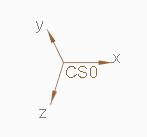
    In addition to having actual arrowheads, we will be providing the option for the CSYS to be zoom dependent and for the user to drag the length of the axes. This means you can set the size relative to the model and it will zoom in and out with the model.

    2 replies

    Mahesh_Sharma
    22-Sapphire I
    September 9, 2015

    Text size for csys tag can controlled by config option text_height_factor with value (value as 50)

    raviles1-VisitorAuthor
    1-Visitor
    September 9, 2015

    Mahesh,

    This does not appear to work. I searched for it in my config.pro and did not find it. I added text_height_factor with value of 75 but there was no change. I opened options again, and it's missing again. I think my corporate overlords may prevent me from modifying it.

    Ray Aviles

    Mahesh_Sharma
    22-Sapphire I
    September 9, 2015

    Ramon,

    If your config file is overwritten by corporate config, you may try creating a new config file with that option and value to 30 or so and place that config file in your startin directory of Creo.

    1-Visitor
    September 10, 2015

    For what it's worth, we are working on a project in Creo 4.0 to improve the appearance of the coordinate system.

    It's not completely done yet, so the appearance might change a little, but here is a screenshot of the new CSYS:

    In addition to having actual arrowheads, we will be providing the option for the CSYS to be zoom dependent and for the user to drag the length of the axes. This means you can set the size relative to the model and it will zoom in and out with the model.

    23-Emerald IV
    September 10, 2015

    ... we will be providing the option for the CSYS to be zoom dependent ...

    Very nice!  I can't tell you how many times I've zoomed into a model to try to see a coordinate system better only to be reminded that they don't zoom.