

Dale_Rosema
23-Emerald III
August 14, 2023
Solved

Cursor not visible in family table cell: 9.0.5.0

  • August 14, 2023
  • 5 replies
  • 1620 views

Currently running 9.0.5.0 on two work stations and the issue as stated in the following post was not resolved:


https://community.ptc.com/t5/3D-Part-Assembly-Design/Cursor-not-visible-in-family-table-cell/m-p/875073/thread-id/129131#M129649


Going to either open a new case or see if the previous one can be reopened.


(Previous case: 16880414)
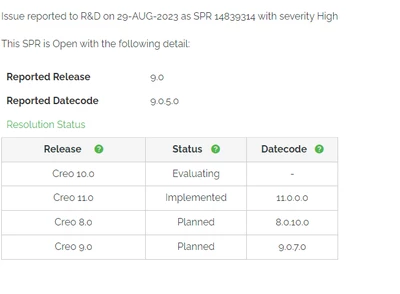
Best answer by Dale_Rosema

The case of the missing cursor in family tables will be resolved as shown below:


Dale_Rosema_0-1697456853193.png

Thanks PTC for fixing this!!!

5 replies

Dale_Rosema
23-Emerald III
August 14, 2023

Re-opening the case.

Dale_Rosema
23-Emerald III
August 15, 2023

New case number


Case 16997701 has been opened.


It is inconsistent. Hit F2 in one cell and the cursor is there. Hit F2 in another cell and the cursor is not visible.

I was able to reproduce it for the Creo Tech person.

Dale_Rosema
23-Emerald III
August 30, 2023

The case has been assigned SPR14839314 with a high level of severity.


Also noted was that when  cell is empty and you move your cursor to the cell using the arrow keys the cell doesn't show any indication of its location.

When a cell has contents, the color flips (black on white becomes white on black).

Dale_Rosema
Dale_Rosema23-Emerald IIIAuthorAnswer
23-Emerald III
October 16, 2023

The case of the missing cursor in family tables will be resolved as shown below:


Dale_Rosema_0-1697456853193.png

Thanks PTC for fixing this!!!

Dale_Rosema
23-Emerald III
January 3, 2024

Creo 9.0.7.0 installed today and the cursor is visible when editing a family table cell using "F2".

Woo-hoo. No more playing "Guess where the cursor is in the cell"!