

14-Alexandrite
September 17, 2019
Solved

Custom BOM Balloons and Layers

  • September 17, 2019
  • 2 replies
  • 3497 views

I am using CREO 3.0 M090.


I want to create a Custom BOM Balloon, which I can do.


In the custom BOM Balloon I want it to  display a model parameter, which I can do.


The issue is I want to circle or ellipse that I use to define my custom BOM Balloon to be hidden.

I created the geometry and text for my custom BOM Balloon in a drawing.  I placed the circle or ellipse on a hidden layer.

I then created a new symbol and selected the drawing geometry.  The circle or ellipse shows up in my symbol definition window.  I save this symbol in Windchill.

I am going down this path so that I take advantage of the Merge Balloons option in the Table tab.

I want to be able to Balloon several parts and then use the Merge Balloons command to remove all leaders except for a single leader.


When I take this custom BOM Balloon and use it in another drawing the circle or ellipse is visible, even though I have the same hidden layer.


Am I missing anything?


Thanks,


John


Best answer by MartinHanak

@jforsyth wrote:

Martin,


Good question.


Using the default BOM Balloons I can merge several balloons together which removes all of the leaders except for a single leader.


I am trying to duplicate that by creating a Custom BOM Balloon that displays a model Parameter instead of the rpt.index.


Since I have to have some kind of circular element in order to create a custom BOM Balloon, I don't want the circular element to be visible. 


If I can get this to happen then I can have custom BOM Balloons without the circular element displayed and still take advantage of the merge feature.


I am trying to be able to automatically create something like the attached pic while still using the BOM Balloon features.


I hope this explains what I am trying to accomplish.


Hi,

if I understand you well you use circle to enable users to position merged balloons properly.

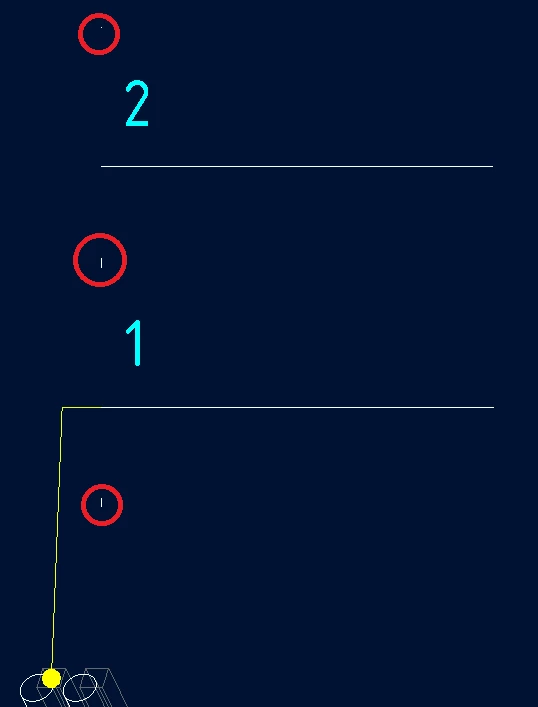
I think you can replace circle with very small lines located at proper places in symbol definition. Because they are "almost invisible", you do not have to hide them.

Example:

invisible.png

2 replies

Chris3
21-Topaz I
September 17, 2019

I have spoken with PTC about this in the past. It is not currently possible to hide the circle. The best you can do is to make it really small.

24-Ruby III
September 18, 2019

Hi,

please can you explain why do you add a circle into custom BOM symbol and then hide it ?

jforsyth14-AlexandriteAuthor
14-Alexandrite
September 18, 2019

Martin,


Good question.


Using the default BOM Balloons I can merge several balloons together which removes all of the leaders except for a single leader.


I am trying to duplicate that by creating a Custom BOM Balloon that displays a model Parameter instead of the rpt.index.


Since I have to have some kind of circular element in order to create a custom BOM Balloon, I don't want the circular element to be visible. 


If I can get this to happen then I can have custom BOM Balloons without the circular element displayed and still take advantage of the merge feature.


I am trying to be able to automatically create something like the attached pic while still using the BOM Balloon features.


I hope this explains what I am trying to accomplish.

24-Ruby III
September 18, 2019

@jforsyth wrote:

Martin,


Good question.


Using the default BOM Balloons I can merge several balloons together which removes all of the leaders except for a single leader.


I am trying to duplicate that by creating a Custom BOM Balloon that displays a model Parameter instead of the rpt.index.


Since I have to have some kind of circular element in order to create a custom BOM Balloon, I don't want the circular element to be visible. 


If I can get this to happen then I can have custom BOM Balloons without the circular element displayed and still take advantage of the merge feature.


I am trying to be able to automatically create something like the attached pic while still using the BOM Balloon features.


I hope this explains what I am trying to accomplish.


Hi,

if I understand you well you use circle to enable users to position merged balloons properly.

I think you can replace circle with very small lines located at proper places in symbol definition. Because they are "almost invisible", you do not have to hide them.

Example:

invisible.png