

SamuelBrantner
16-Pearl
April 26, 2012
Solved

Customized BOM Balloons

  • April 26, 2012
  • 2 replies
  • 3828 views

Hey,


i am working with creo parametric M020 and i am trying to edit the BOM Balloons, but somehow i can't change them to take a custom bom.sym.


I tried the following command:
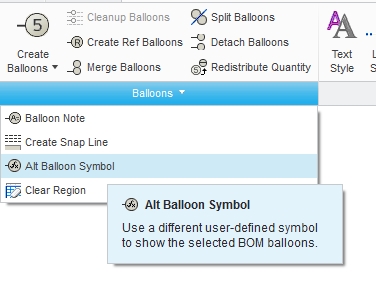
ScreenShot 588 OVERVIEW (Active) C__temp_creo_EFX_PROJEKTE_EFX-Schulung_EFX-Schulung_ADV_connectors_and_weldgroups_new_done_overview.drw.1 - Creo Parametric.jpg


any ideas?


greetz sam


This thread is inactive and closed by the PTC Community Management Team. If you would like to provide a reply and re-open this thread, please notify the moderator and reference the thread. You may also use "Start a topic" button to ask a new question. Please be sure to include what version of the PTC product you are using so another community member knowledgeable about your version may be able to assist.
Best answer by James62

hi Samuel,

You can try following.

Select your table with repeat region using "Select Table" then click on Properties either from RMB menu or Table tab. After that click on BOM Baloons tab in the table that has opened and set your custom BOM symbol under Type.

2 replies

James621-VisitorAnswer
1-Visitor
April 26, 2012

hi Samuel,

You can try following.

Select your table with repeat region using "Select Table" then click on Properties either from RMB menu or Table tab. After that click on BOM Baloons tab in the table that has opened and set your custom BOM symbol under Type.

SamuelBrantner
16-Pearl
May 2, 2012

thanks alot!

Greetings Sam