
12-Amethyst
December 9, 2016
Question

Cylinder mechanism in lybrary

  • December 9, 2016
  • 2 replies
  • 3653 views

Hi Guys,

we are using Creo 3.0 M070 without Windchill.

We are working with 7 engineers together on a server and we do have a library with normparts in it (such as bolts, pneumatic cylinders, gears,...).

In the past we haven't used the mechanism functionality of Creo yet (don't ask me why).

Now we want to start using the mechanism functionality and we had a nice training for it yesterday.

We do have a lot of cylinders in our Library which have to be modified to mechanisms. This is no problem, but I think we will have some other problems (and the guy who was training us, couldn't help us with it):

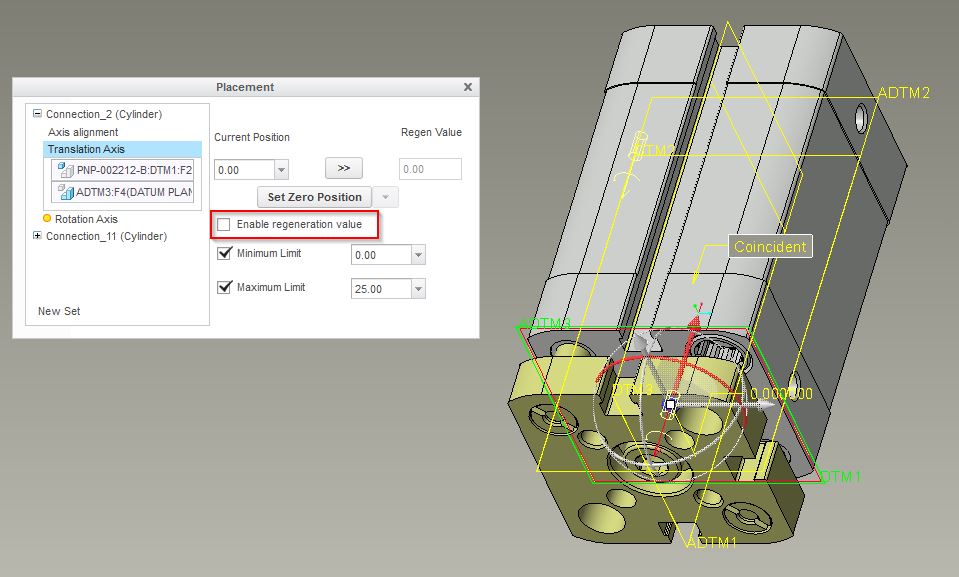
1. We don't want to have the Enable Regeneration Value checked on, because otherwise all cylinders in our machines will be in the IN-position again when you do a regeneration.
And we want to stay them in the position as they are.
Cylinder 01.jpg
I don't think this will be a problem...

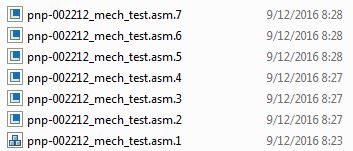
But this means that when we drag the cylinder-position just a bit and push SAVE, the assembly will be saved over and over again in the library:
Cylinder 02.jpg
This will be a problem when at least 2 engineers will have the same cylinder in session at the same moment...
Can anyone tell me how to solve this. Maybe there a parameter to be switched off...
We don't want to make a local copy of the cylinder in each project, because that will kill the advantages of our library...

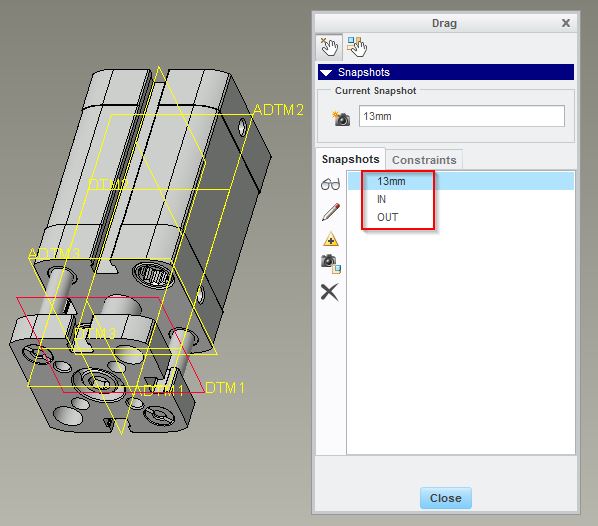
2. We can make some snapshots of the cylinder-assembly, let's say the IN and OUT position and maybe some extra fixed positions:
Cylinder 03.jpg

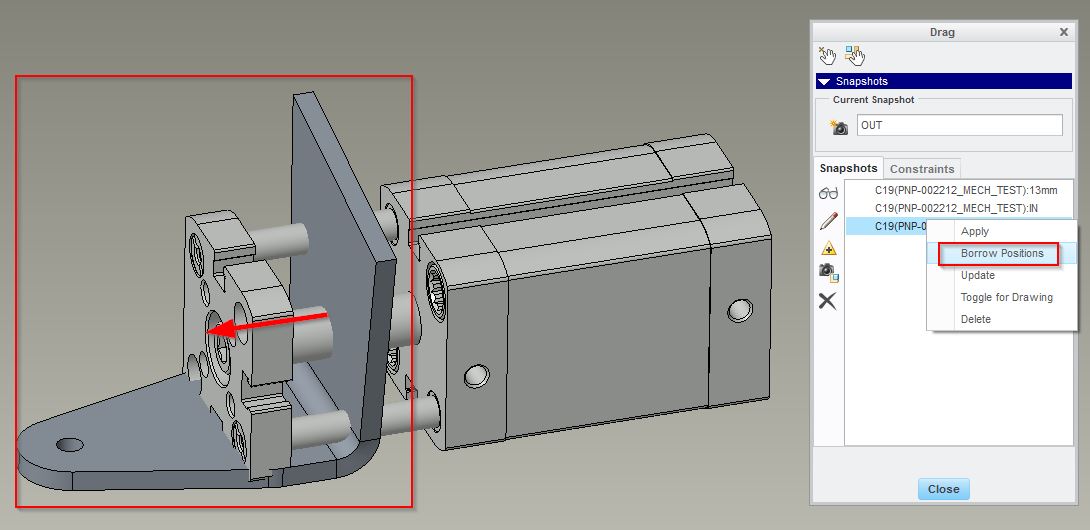
And we can borrow these snapshots in a higher level assembly:
Cylinder 04.jpg

But the problem is that the parts which are assembled on the cylinder aren't following the cylinder position (without doing a regeneration).

Is there somebody who knows how to solve this?

Thanks for the help guys!


This thread is inactive and closed by the PTC Community Management Team. If you would like to provide a reply and re-open this thread, please notify the moderator and reference the thread. You may also use "Start a topic" button to ask a new question. Please be sure to include what version of the PTC product you are using so another community member knowledgeable about your version may be able to assist.

2 replies

1-Visitor
December 9, 2016

I really have to dispute your 1st point:

1. We don't want to have the Enable Regeneration Value checked on, because otherwise all cylinders in our machines will be in the IN-position again when you do a regeneration.

- only true if you assemble them "as-is".  But if you assemble them as "flexible component" then you can vary what is the "default position" of each instance...

So, these cylinders are actuators, or "drivers" of your assembly motion, you should have the "Enable regeneration value" checked ON.

Furthermore, I would suggest that when you are preparing these library components, name this dimension and prescribe it as flexible prior to storing the cylinder in your library.  This will save you and your users from a lot of work and confusion.

Step 1) define the regeneration value to create a dimension that will be "flexible"

flex_component_prep_1-motion.png

Note: I sometimes find definition of "motion limits" in the mechanism joint connection definition a bit wonky when Creo insists of using negative values for direction of travel that I consider to be positive.  There is no option to "flip" the direction, so in the above case, we have the limit of the movement from -20 to 0 (-20 being the "extended" position).  But I find that afterwards, I have use positive numbers to specify the extension distance!  The gotcha is that if you leave your regeneration value at "0": When you assemble such flexible component into another assembly, you will get a regeneration failure because for the inserted instance, the "flexed" distance will have a negative sign!  Anyway, hard to explain and very confusing, but I work around that by putting away cylinders with such negative limits in their 1/2 position - in this case, -20mm.  Then this is inserted into the assembly, the default position will be extended, but you will not have the regeneration failure.

Step 2)  Rename this dimension by editing it's properties.  No one will remember what d1 means.

flex_component_prep_2-dimension.png

Step 3) Edit the model's properties and prescribe the flexiblity:

flex_component_prep_3-dims_meant_for_flexing.png

Tip: use query-select to get at this "C"omponent level dimension.

1-Visitor
December 9, 2016

The FLIP Connection is in the dashboard header and not on the placement tab.

Flip Connection.JPG

1-Visitor
December 9, 2016

Ah, ok!, thanks a lot.  Not sure how I missed that button all these years

23-Emerald IV
December 9, 2016

One additional comment.  You really should change the permission on your library folder so that it's read only.  You don't want people accidentally saving changes to library models.  This can cause tremendous problems with all the existing assemblies that depend on these library models.