1-Visitor
November 7, 2017
Solved

Datum Planes shown in Drawing

  • November 7, 2017
  • 2 replies
  • 4804 views

I am new to Creo & wondering how t erase the datum planes that are in this drawing view. The assembly drawing was copied from an existing Wildfire drawing. I would have just chosen to erase all from the view previously.  I do not see where there is an option to erase all.

Best answer by StephenW

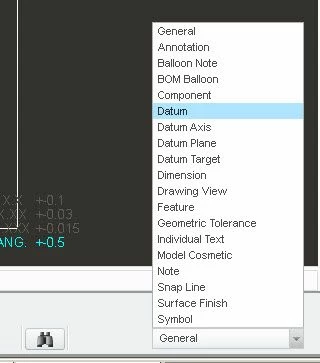
Set the filter in the lower right to datum and then drag a window around all the view.

Also, if you have maintenance, vote for this IDEA.
https://community.ptc.com/t5/Creo-Ideas/quot-Set-Datums-quot-should-be-hidden-by-default-when-placing-a/idi-p/460708/jump-to/first-unread-message

datum-filter.jpg

2 replies

17-Peridot
November 7, 2017

Those old datums are the bane of my existance.

...and the primary reason I don't use PTC's GD&T functionality.


Can you simply "erase" them in the drawing view?


1-Visitor
November 7, 2017

I am picking them one by one to erase, just thought I should be able to erase all by view like we used to be able to. It's very tedious when you have some many to get rid of.

StephenW
StephenW23-Emerald IIIAnswer
23-Emerald III
November 7, 2017

Set the filter in the lower right to datum and then drag a window around all the view.

Also, if you have maintenance, vote for this IDEA.

https://community.ptc.com/t5/Creo-Ideas/quot-Set-Datums-quot-should-be-hidden-by-default-when-placing-a/idi-p/460708/jump-to/first-unread-message

datum-filter.jpg

1-Visitor
November 7, 2017

Thank you - that worked great. I will vote for idea as well.
