
1-Visitor
August 8, 2016
Question

Dimension line in Creo drawing

  • August 8, 2016
  • 2 replies
  • 4903 views

Hi,

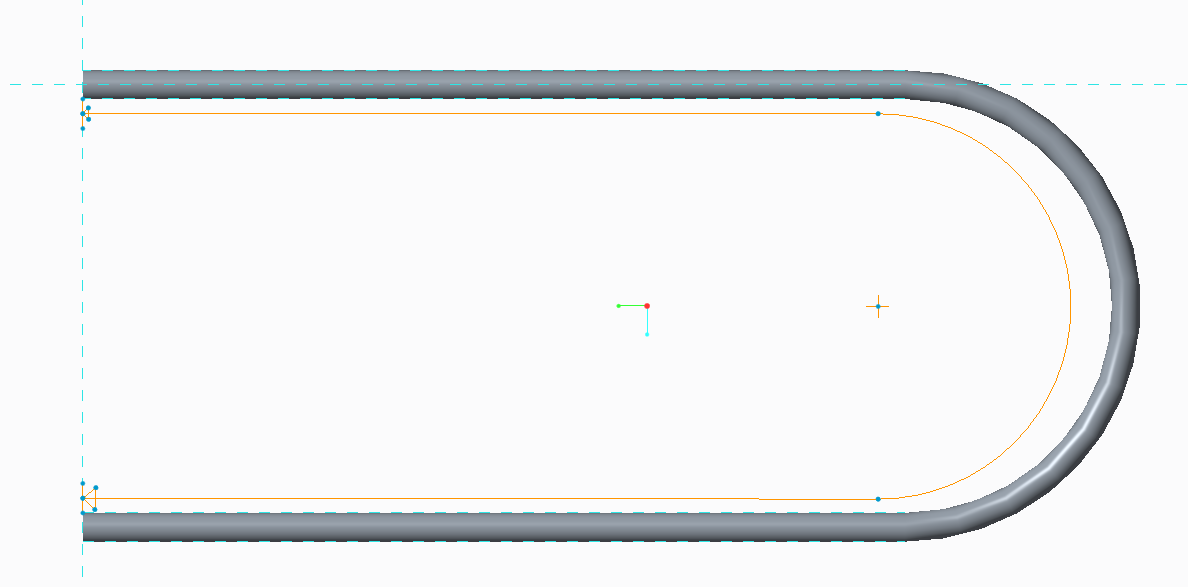
can someone help me in how to represent the semi circle dimension line in creo drawing.

PFA of the image below.

Regards

Sharath

This thread is inactive and closed by the PTC Community Management Team. If you would like to provide a reply and re-open this thread, please notify the moderator and reference the thread. You may also use "Start a topic" button to ask a new question. Please be sure to include what version of the PTC product you are using so another community member knowledgeable about your version may be able to assist.

2 replies

KenFarley
21-Topaz II
August 9, 2016

There is no such dimension that I know of. It really doesn't make any sense, anyway. The value of the dimension is entirely dependent on whether it refers to the inner edges, the outer edges, or the "centerline" of what seems to be a tube. If the last one is what you are after, you could calculate the "chord length" using simple relations, then use the calculated value in a note.

ss-10-111-VisitorAuthor
1-Visitor
August 9, 2016

Hi Kenneth,

Yeah it semi circular tube. In the previous auto cad drawing they have represented end to end tube dimension in that way.

If its not possible to represent in that manner, how can I represent the semi circular tube dimension in Creo drawing.

Kindly help on this.

Regards

Sharath

KenFarley
21-Topaz II
August 9, 2016

The last sentence says "...calculate the 'chord length' using simple relations, then use the calculated value in a note".

In other words, use the relations functionality of Creo to calculate the length of the tube in the same way you would by hand.

For example, if you assume the centerline length of the tube stays the same before and after bending, and the u-shaped section has a straight length of "L" and a centerline bend diameter of "D", you can create a parameter called "LENGTH" and calculate it as:

LENGTH = 2 * L + PI * D / 2

Then create a note, and in the text of the note put something like "TUBE LENGTH REQUIRED: &LENGTH".

The &LENGTH will be replaced in the depiction of the note with the calculated value.

14-Alexandrite
August 9, 2016

you can also use perimeter dimension

peri_dim.JPG

Regards

Pushkar

KenFarley
21-Topaz II
August 10, 2016

Interesting. I wish I'd known about this particular dimension type when I was defining O-ring grooves in the past. Could also be useful for timing belts and such.