10-Marble
August 3, 2024
Solved

Dimension line size in inspection mode

  • August 3, 2024
  • 2 replies
  • 2781 views

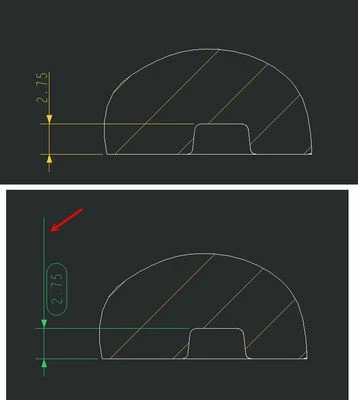
When I add an inspection circle to some dimensions, the dimension line extends more than required. In the following figure, this condition is shown, could anyone help me adjust it (PTC Creo 2)?

dim leader.jpg

Best answer by Radovan_DT

Figured it out its "dim_text_gap", your settings have 5, I am using 1

2 replies

Community Moderator
August 8, 2024

Hello @MohaSharifi


Thank you for your question. 

Your post appears well documented but has not yet received any response. I am replying to raise awareness. Hopefully, another community member will be able to help.

Regards,

Vivek N
Community Moderation Team.

10-Marble
August 11, 2024

Hi Vivek,

Thank you

21-Topaz I
August 8, 2024

I am not able to reproduce that in Creo 9. Is it possible to share a simplified model with the issue?


Capture.PNG

10-Marble
August 11, 2024

Hi Chris,


I attached the drawing and drawing option settings. I wanted to have all units in mm in the drawing option and changed most of them but I don't know which option controls dimension line length in inspection mode.


2024-08-11_13-05-03.jpg

14-Alexandrite
August 12, 2024

Figured it out its "dim_text_gap", your settings have 5, I am using 1