Dale_Rosema
23-Emerald III
23-Emerald III
January 14, 2026
Solved

Dimension Text Symbols Pallet changed

  • January 14, 2026
  • 4 replies
  • 172 views

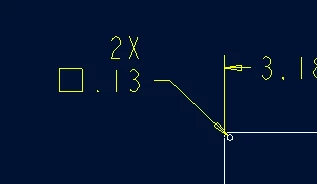
I recently has some symbols in drawings change. Some are missing.

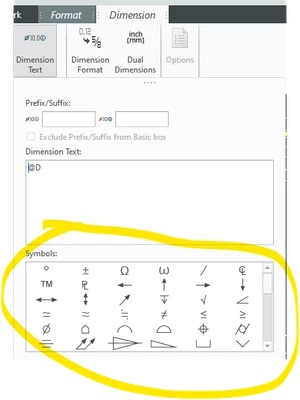
Then I noticed that the Dimension Text Symbol Pallet has changed.

Did I accidently delete something or redirect something to make this change?
 

Dale_Rosema_1-1768405446399.png


Dale_Rosema_0-1768405422091.png


I checked this post and a couple of others without finding a solution:
 

https://community.ptc.com/t5/3D-Part-Assembly-Design/Symbols-missing-from-dimension-text-pallet/m-p/967490#M136117

Best answer by Dale_Rosema

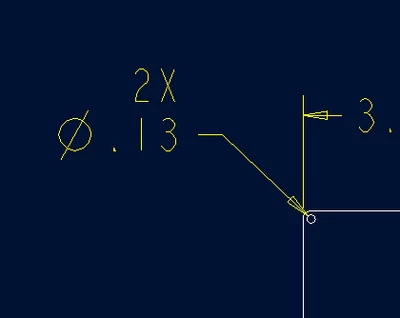
I switched it stroked_asme and now it is not bold:


Dale_Rosema_0-1768415757956.png


4 replies

Dale_Rosema
23-Emerald III
23-Emerald III
January 14, 2026

From an older drawing:


Dale_Rosema_1-1768405658991.png


Dale_Rosema
23-Emerald III
23-Emerald III
January 14, 2026

If I do a "Save As" from one drawing to another, the pallet remains as the old one.


A start part from 2021 results in the new pallet (though this issue is very recent).

Dale_Rosema
23-Emerald III
23-Emerald III
January 14, 2026

Dimension that already exits on a previous drawing stay with the old pallet.

New dimension created on a "Save As" drawing have the new pallet.

kdirth
21-Topaz I
21-Topaz I
January 14, 2026

Between Creo 7 and Creo 13 there are a lot more symbols to pick from.  I would hope that they would keep the same names/designations for each symbol going forward, but the order is jumbled in 13 compared to 7, making me think the answer is no.

There is always more to learn.
Dale_Rosema
23-Emerald III
23-Emerald III
January 14, 2026

I added one from the pallet and got an additional "square" - blank text.


Dale_Rosema_2-1768410988840.png


Dale_Rosema
23-Emerald III
23-Emerald III
January 14, 2026

If I type anything in the Dimension Text box (e.g. REF, 4X, ...) the typed text appears as desired.


Anything selected from the Symbols box shows in the Dimension Text box, but shows up as the blank box on the drawing with one exception so far - the degree symbol...

14-Alexandrite
January 14, 2026

This is controlled by the symbol_font option in the dtl settings.  Choosing asme for the option value gives you the new symbols you are seeing.


mkajdan_0-1768413136584.png


Dale_Rosema
23-Emerald III
23-Emerald III
January 14, 2026

I didn't find symbol_font, but I found intf2d_in_symbol_font.


Also, why would this have changed recently? Accidental click?


I tried switching it to legacy and that didn't solve it.

14-Alexandrite
January 14, 2026

Change it in the drawing properties (.dtl), not the main config properties (config.pro).