1-Visitor
November 12, 2020
Solved

Dimensioning Externally Generated Body

  • November 12, 2020
  • 2 replies
  • 5233 views

Hi,


In order to limit the number of individual components and separate dimension changes in a CAD model, I decided to model all components as separate bodies within the same file. This allowed for easier relations alteration and referencing between bodies (eg. remove intersected body, add hole through all intersected geometries, etc). Once all the component were finished, individual parts could be generated for dimensioning and assembly purposes using the "Create part from body" feature.


Currently,  I am unable to see any reference axis or points when I go to dimension the individual part. "Annotate<Show Model Annotations" does not bring back any dimensions or reference points (No annotations can be shown in the current sheet/view for the selected objects). I am not sure if this is related to how the body was created or what the implications of copying external geometries features may do when trying to dimension a component - by all expectations I expected this to be a useful feature for multi-body modeling.


Help with this would be appreciated!  

Best answer by tbraxton

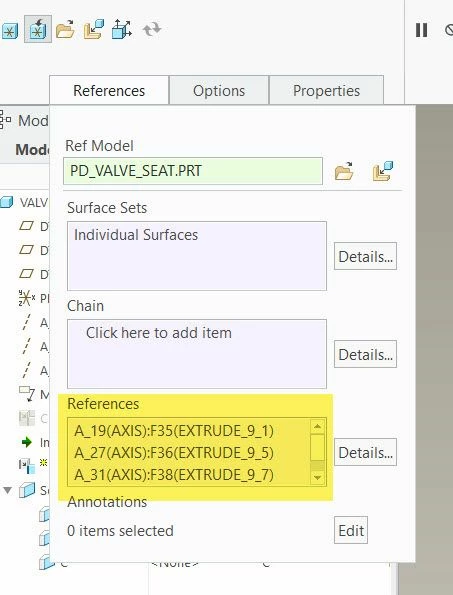
I have not tested this in Creo 7. Reading about the functionality when you create a part from a body an external copy geometry feature is created in the part. You can add references to a manually created ECG to include datum features, try to redefine the multibody generated ECG in a part and test if you can add datums from the master model to the extracted body part.


You should be able to add another ECG feature to include datums if it is not possible to add them to the auto generated ECG in the body part.


Datum refs in external copy geomDatum refs in external copy geom


2 replies

tbraxton
22-Sapphire II
tbraxton22-Sapphire IIAnswer
22-Sapphire II
November 13, 2020

I have not tested this in Creo 7. Reading about the functionality when you create a part from a body an external copy geometry feature is created in the part. You can add references to a manually created ECG to include datum features, try to redefine the multibody generated ECG in a part and test if you can add datums from the master model to the extracted body part.


You should be able to add another ECG feature to include datums if it is not possible to add them to the auto generated ECG in the body part.


Datum refs in external copy geomDatum refs in external copy geom


13-Aquamarine
December 24, 2020

Within the parts that you exported, have you had trouble showing dimensions using the Show Model Annotations command?

tbraxton
22-Sapphire II
22-Sapphire II
December 24, 2020

No but I am not using Creo 7 for production work. I think your question is different than that of the OP and is probably valid. I suggest that you start a new post detailing your specific issue. I infer from your query that you are attempting to show annotations that are defined in an external model propagated to a derivative model using external copy geometry in the derivative model.

tbraxton
22-Sapphire II
22-Sapphire II
November 14, 2020

I have just confirmed that the method in my post above does work.


1) Open the part created from a body

2) Redefine the ext copy geom and select the references tab and activate the references collection box

3) Select the datum references as required from the master model

4) LMB "OK" to finish the feature


You will now have the desired datums from the master included in your part

1-Visitor
November 16, 2020

Hi Tbraxton,


Thanks for the insight, would you be able to explain where you found your redefine commands for the ECG? I tried doing similarly, but could only view the "Edit references" and "Reference Viewer" utilities with base ID references from the original multibody part - not the screen that would allow me to enable the reference collection box as you mentioned.


Much Appreciated!

tbraxton
22-Sapphire II
22-Sapphire II
November 16, 2020

This short video will explain it in detail. One caveat is that you must have a license that supports the top down design tools which includes copy geom features. If you do not have the required license then you will not be able to edit the definition of the ECG.