13-Aquamarine
Sep 6, 2022 8:19 PM UTC
Solved

Disable perpendicularity bubble (Drawing)

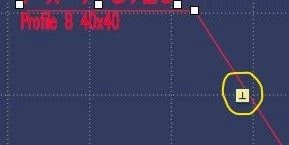
Hey guys, I'm on Creo Parametric 6.0 and I'm would like to know where can I disable the perpendicularity when I place bubbles in drawings. As you can see below, there is the perpendicularity symbol showing up which makes the placement harder.
Creo.jpg

Thanks in advance.

StephenW
StephenWAnswer
23-Emerald III
Sep 8, 2022 2:15 PM UTC

@SR_CAD 

It was specifically updated in Creo 4 M130 (released May 4th, 2020).

Since I don't have any specific documentation on this change, I can only guess, but I would say any Creo 6 release after that date likely also has the same update. Those Creo 6 build codes would be 6.0.5.1 and 6.0.6.0 (both released after May 4th, 2020) You can check your installation under File - Help - About Creo Parametric.

Dates are based off of the product calendar https://support.ptc.com/cs/release_calendar/index.html


5 replies

kdirth
21-Topaz I
Sep 6, 2022 8:33 PM UTC

Check out the solution to this Creo Idea


Option to disable/turn off annotation leader snapping constraints 

Translate
There is always more to learn.
SR_CAD13-AquamarineAuthor
13-Aquamarine
Sep 8, 2022 12:37 PM UTC

Hi, it seems like this solution is not in Creo Parametric 6.0.

Is Creo Parametric 4.0 more updated than 6.0 ?

Translate
kdirth
21-Topaz I
Sep 8, 2022 1:21 PM UTC

As @StephenW  mentioned in the referenced Idea, Creo 4 in an enterprise release and receives support updates longer than 5 or 6.  Creo 6 may have never received this update.  Are you using the latest release of Creo 6 - 6.0.6.0?


You could also try holding Shift while moving bubbles.

Translate
There is always more to learn.