
24-Ruby III
April 20, 2018
Question

Display of start/end edge of cosmetic thread in x-section view in drawing

  • April 20, 2018
  • 1 reply
  • 1889 views

Hello,


can anybody explain current Creo functionality ? My files created in CR3 M150 are attached.
 

test1.png

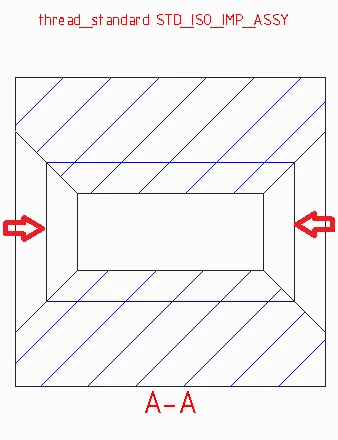
If thread_standard  STD_ISO_IMP_ASSY detail option is set then start/end edge of cosmetic thread is displayed. Does anybody know, why ?
 

test2.png

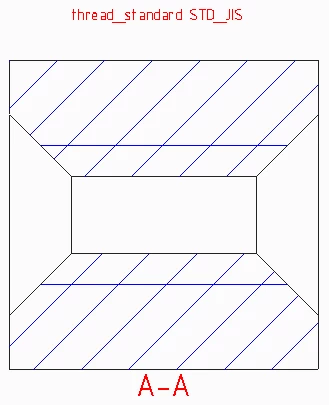
It is interesting that if thread_standard  STD_JIS detail option is set then start/end edge of cosmetic thread is NOT displayed.


I appreciate any piece of information...

1 reply

17-Peridot
April 20, 2018

I appreciate you pointing this out, Martin.

Never realized there was an option.

Often I erase all cosmetics just to avoid this messy detail.


I'll confer Creo 2 to see if this is a similar functionality.

17-Peridot
April 20, 2018

Yep, Creo 2 does this. 


I left it at the default ANSI version and the line ends of the cosmetic threads show.

Then changed the setting to JIS.

Subsequent sections take on the new value or on regeneration.


However, and this happens too often in Creo; regeneration will change all the cosmetic threads to whatever standard is defined.  But when you try to force a regeneration, the comment line says nothing has changed.

I WANT TO BE ABLE TO THAT!  All too often I find I need a regeneration for models or drawings and Creo simply wants to argue about it.  I'm sorry, but things HAVE changed when I changed the detail setting!