
1-Visitor
October 21, 2020
Solved

Display R for Radius in sketches?

  • October 21, 2020
  • 2 replies
  • 2469 views
 

I'd like to be able to tell at a glance when I'm opening a sketch whether something is a radius or diameter dimension. Is there a way I can make so that these dimensions will always automatically appear in the sketcher with the respective prefix, i.e. R for radii and D or ⌀ for diameters?
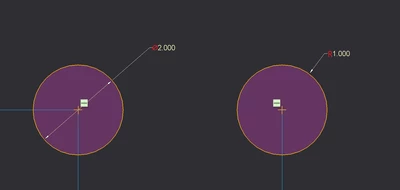
 

R_D_example.png

Best answer by LukaszMazur
I don't think you can do it by yourself. This change has been introduced in Creo 5.0 and PTC considers it a Sketcher enhancement: http://support.ptc.com/help/creo/creo_pma/usascii/#page/whats_new_pma%2FPartModelingSketcher.html%23
Apparently it needed to be coded into Creo.

2 replies

Patriot_1776
22-Sapphire II
October 21, 2020

It's easy, when you see the double arrows on the left, it's a diameter, the single arrow on the right denotes radius.

16-Pearl
October 22, 2020
I don't think you can do it by yourself. This change has been introduced in Creo 5.0 and PTC considers it a Sketcher enhancement: http://support.ptc.com/help/creo/creo_pma/usascii/#page/whats_new_pma%2FPartModelingSketcher.html%23
Apparently it needed to be coded into Creo.
TC_skidz1-VisitorAuthor
1-Visitor
October 22, 2020

Ahh I see. Bummer. Thanks!