
1-Visitor
March 26, 2015
Solved

Divide columns for part list

  • March 26, 2015
  • 4 replies
  • 1362 views

how can I divide in my drawing the part list in two columns? The list is too long and doesn´t fil in the drawing and would like to have it in two columns.

Thank you!

Best regards,

Edna


This thread is inactive and closed by the PTC Community Management Team. If you would like to provide a reply and re-open this thread, please notify the moderator and reference the thread. You may also use "Start a topic" button to ask a new question. Please be sure to include what version of the PTC product you are using so another community member knowledgeable about your version may be able to assist.
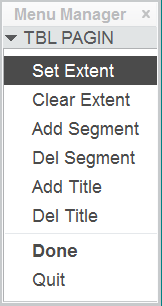
Best answer by MartinHanak

Hi,

  • activate Table tab
  • set filter to Table
  • select table on the drawing
  • click Paginate command in Table group

paginate.png

Use commands available in menu. To understand their function, use PTC Help Center at http://help.ptc.com

Martin Hanak

4 replies

24-Ruby III
March 26, 2015

Hi,

  • activate Table tab
  • set filter to Table
  • select table on the drawing
  • click Paginate command in Table group

paginate.png

Use commands available in menu. To understand their function, use PTC Help Center at http://help.ptc.com

Martin Hanak

1-Visitor
March 26, 2015

Thank you

Mahesh_Sharma
22-Sapphire I
March 26, 2015

In addition to Martin's response, after selecting Paginate command in Table group select the location in table to define pagination and Done. Paginated part of table will place on next sheet.

1-Visitor
March 26, 2015

Thanks so much