
1-Visitor
October 3, 2011
Solved

Does anyone meet this problem?

  • October 3, 2011
  • 2 replies
  • 1560 views

hi there,

I am working with a sheet metal and met a strange problem:

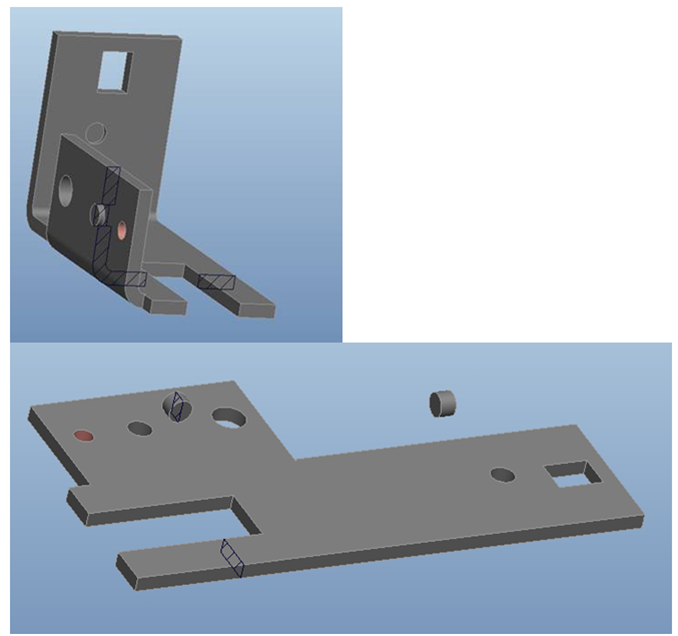
I used the Punch from tool to perform a shap (like the nut), the deformation is ok but when i unbend or make a flat pattern the nuts don't follow the wall (see picture below).

The nuts hang in mid air is cause of a mistake in 2D drawing.

please advise!
Picture1.png


This thread is inactive and closed by the PTC Community Management Team. If you would like to provide a reply and re-open this thread, please notify the moderator and reference the thread. You may also use "Start a topic" button to ask a new question. Please be sure to include what version of the PTC product you are using so another community member knowledgeable about your version may be able to assist.
Best answer by PhuongNguyen

Thanks Brian for your help

but I have tried "Punch_Axis_Point" function and it is only working with the cutting features not with deformation features (like this case)

at the moment, I continue researching on it but have no clue yet

if you have any ideas else, please share me.

best regards,

phuong

2 replies

13-Aquamarine
October 3, 2011

Hi Phuong...

Just to clarify, are you trying to create your feature using a punch or a die? It looks like you're trying to use a punch. If so, take a look at PUNCH AXIS POINT as a means to palce your punch. The punch axis point WILL bend and unbend with the rest of your geometry.

If I'm misunderstanding your question, please restate it and I'll do my best to help!

Thanks!

-Brian

PhuongNguyen1-VisitorAuthorAnswer
1-Visitor
October 10, 2011

Thanks Brian for your help

but I have tried "Punch_Axis_Point" function and it is only working with the cutting features not with deformation features (like this case)

at the moment, I continue researching on it but have no clue yet

if you have any ideas else, please share me.

best regards,

phuong