
1-Visitor
November 19, 2013
Solved

Draw an axis through a point, normal to a surface

  • November 19, 2013
  • 14 replies
  • 8277 views

And the point is not on the surface.

I'm looking for a solution to do this in Creo Parametric 2.0, it's to measure an angle I need to create another part.

I don't care the angle can be defined the sketcher environment or as a measurement feature, the most important thing is to get this angle.
normal_to_surface.png

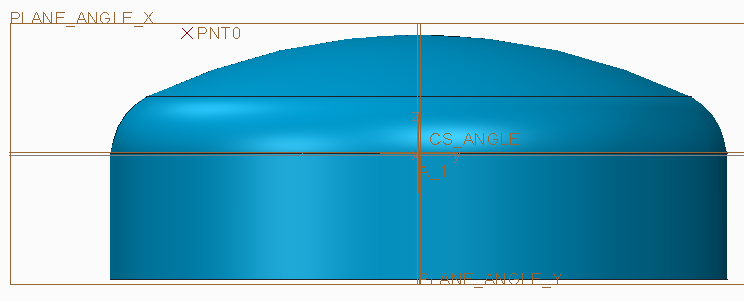
The point is on a surface through the center of the revolved surface. The surface can be hemispherical, ellipsoidal or torispherical. (it's a pressure vessel head).

Thanks!

Jeroen.


This thread is inactive and closed by the PTC Community Management Team. If you would like to provide a reply and re-open this thread, please notify the moderator and reference the thread. You may also use "Start a topic" button to ask a new question. Please be sure to include what version of the PTC product you are using so another community member knowledgeable about your version may be able to assist.
Best answer by PatrickBrulot

Hi Jeroen,

I think this will be a suitable solution for you.

Create a measure distance feature between the point and surface. This creates a datum point on the surface.

You can now create a curve through points and measure the angle.

See the attached file. I took the part from this discussion, copied the surfaces to a quilt and added the measure feature. I you correctly define the quilt it should be stable.

Patrick

14 replies

1-Visitor
November 19, 2013

try this Jeroen

Regards

John

1-Visitor
November 19, 2013
Jeroen1-VisitorAuthor
1-Visitor
November 19, 2013

If i'm correct, your first example is not the one I'm looking for, the point is on the surface.

The second one seems to be exactly what I need.

But... If I try to replicate this, I cannot select both the point and the surface to (re)create this axis.

Can you help me out with this? How did you do this?

I'm a little bit closer now.

The point you created is defined as being on a distance normal to the surface.

By doing this, it is possible to 'revert' this action and draw an axis normal to this surface.

But...

The point I need to create is created with no reference to the surface.

It is on a datum plane (DTM3), and offsetted from DTM1 and DTM2.

Is it possible to create the normal axis like this?

1-Visitor
November 19, 2013

Hopefully the attached screen shot will explain, have you created the intent surface first? You also need to click the "on" to change it to "offset", (see screen shot).

JohnScreenHunter_03+Nov.+19+12.57.jpg

November 19, 2013

Jeroen,

I would try using a sketched entity since it is on a plane through the axis of the cylinder. Try this:

  1. go to sketcher in the plane of the axis and the point of interest.
  2. make the surface one of your references and the point another
  3. sketch a centerline tangent to the surface near where you expect the "axis" to be
  4. sketch a line or centerline through the point and perpendicular to the tangent line
  5. create a reference dimension to measure the angle of interest

Hope this helps,

Karl

Jeroen1-VisitorAuthor
1-Visitor
November 20, 2013

Hello,

I tried this, but the solution is not stable.

The surface is a pressure vessel head model. This model will be a master model that can vary in size and type (hemispherical, torispherical, ellipsiodal, ...) The sketch or other solution should be stable so it will regenerate in any possible situation.

1-Visitor
November 22, 2013

If the surface of the master model is created using a spline, the spline can be set to match any curvature within whatever accuracy you like and the solution will work.

10-Marble
November 22, 2013

Hi Jeroen,

I think this will be a suitable solution for you.

Create a measure distance feature between the point and surface. This creates a datum point on the surface.

You can now create a curve through points and measure the angle.

See the attached file. I took the part from this discussion, copied the surfaces to a quilt and added the measure feature. I you correctly define the quilt it should be stable.

Patrick

Jeroen1-VisitorAuthor
1-Visitor
November 25, 2013

Nice one!

But strange, why would a measurement be able to find the normal projection, and why doesn't Creo allow this to do as a regular feature?

Nevertheless, thank you!

1-Visitor
November 26, 2013

It doesn't seem strange that the measurement would find the nearest point on a surface to a point in space, but it is strange that there isn't a more direct/obvious* way to do this.

It also works to create a sketch on a plane through the point and the tank's axis of revolution - a circle that is tangent to a reference curve of the profile of the surface, and centered on the point. Using a spline for the tank end driver offers unlimited flexibility in the shaping of the tank end, so there is no need to perform a geometry replacement. A second sketch can be created with a point that is constrained to being on both the circle and the curve, which is the tangency point, and a line drawn from that point through the original datum point to establish the angle.

The following seemed likely to work, but were not supported** in WF5:

Axis through a point, normal to a surface (expects 2 non-point offset references after the surface selection, maybe it works if another datum plane through the axis and the point is constructed.)

Project a point on a surface (only projects curves, though a degenerate case for a curve is a point ...)

Create a sketch with a reference line that is tangent to both the circle and the surface profile (since the circle is already tangent to the surface, this fails, but making the line tangent to only one picks some random location on either the curve or the circle and with it a random orientation)

Create a sketch with a point on both the circle and the reference curve, which is the point of tangency (fails as redundant constraint, but picking either the circle or reference curve alone leaves the point with an unrestricted degree of freedom and not at the tangency.)

*It's like a Zork knock-off where the phrases: Pick up the ball, lift the ball, get the ball, grab the ball, gather the ball, pack the ball, retrieve the ball, steal the ball, fetch the ball, harvest the ball, and obtain the ball, are all met with "I don't know how to ..." and it turns out the only acceptable answer is "Cradle the ball."

**Perhaps there is a secret handshake to get these to work, like click, shift-click, then ctrl-doubleclick.