
12-Amethyst
August 5, 2021
Solved

Drawing - Angular dimension orientation greyed out

  • August 5, 2021
  • 1 reply
  • 3033 views

Hi all,


I am working on a 2D drawing where I am adding dimensions. (Creo 4.0).

Some dimensions, I show using 'Show Model Annotations', and some dimensions I add manually.

I now have 2 angular dimensions: one that I added myself, and another that I added using 'Show Model Annotations'.

I noticed that I can change the dimension orientation (Inside Angle, Outside Angle, Supplementary Angle 1, ...) only of the dimension that I added manually. On the 'Show Model Annotations' created dimension, the 'Orientation' button is greyed out in the toolbar. 
Can this be changed, so I can change the orientation of the Annotated dimension also? Or is that fixed?


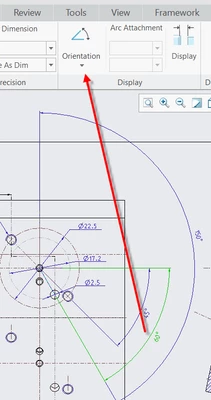
First screenshot shows the 60° angular dimension that I created myself, with the enabled 'orientation' button.
EddyVE_0-1628169186776.png


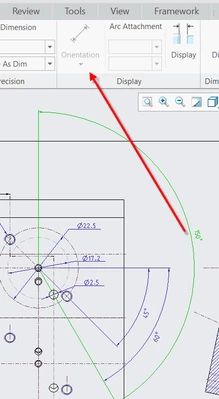
Second screenshot shows the 150° angular dimension with the orientation button greyed out.
EddyVE_1-1628169236448.png


2D Drawing


Best answer by StephenW

Since it's a "shown" dimension, you will have to go in to the model, edit the definition and recreate (or replace) the dimension with one correct for how you want it to show. The orientation is defined by you based on your placement of the dimension. The drawing created dimension doesn't allows orientation because it isn't driving geometry.  

For me, when I am doing a drawing, I usually have to go back in to the model a few times to get the dimensions "correct" to the way I want them to show in the drawing. I don't always plan it out perfectly as I am modeling it.

1 reply

StephenW23-Emerald IIIAnswer
23-Emerald III
August 5, 2021

Since it's a "shown" dimension, you will have to go in to the model, edit the definition and recreate (or replace) the dimension with one correct for how you want it to show. The orientation is defined by you based on your placement of the dimension. The drawing created dimension doesn't allows orientation because it isn't driving geometry.  

For me, when I am doing a drawing, I usually have to go back in to the model a few times to get the dimensions "correct" to the way I want them to show in the drawing. I don't always plan it out perfectly as I am modeling it.

EddyVE12-AmethystAuthor
12-Amethyst
August 5, 2021

Thanks for your reply. That makes sense of course.

I was hoping that there was a way to just make the dimension flip over by selecting an orientation.

The problem in this case is that this particular hole is part of a pattern. The reference for the angle is a patterned datum plane. If I would flip the datum plane over, the angle would probably be right. But then I would mess up a number of other features that also depend on that patterned datum plane.

I will think about it ... 

Thanks again for your fast reply!


23-Emerald III
August 5, 2021

Sometimes the shown dimensions just don't work out for the drawing. My general rule is to use shown dimensions where possible and reasonable but to create the ones that are just not practical or to difficult to get to show up on the drawing.
