
1-Visitor
May 21, 2015
Question

Drawing displays edge that is behind a solid even when "no hidden" is used

  • May 21, 2015
  • 2 replies
  • 4411 views

Why do these edges display in my drawing view? They are behind another solid, and my display is set to "no hidden".
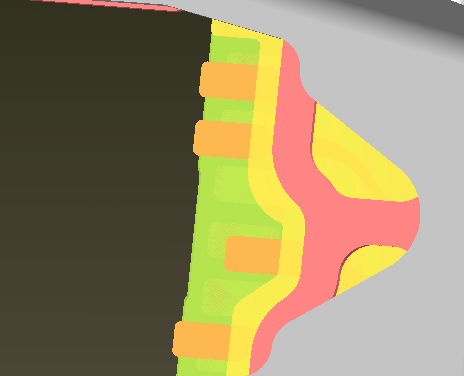
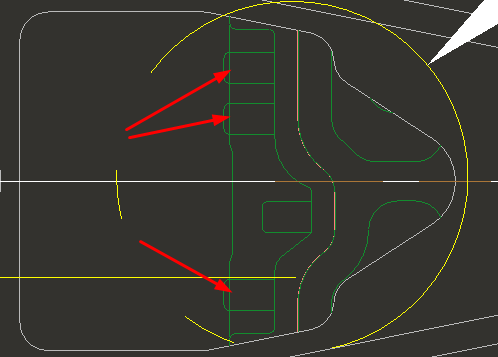
Model view.bmpDrawing edges incorrect.bmp


This thread is inactive and closed by the PTC Community Management Team. If you would like to provide a reply and re-open this thread, please notify the moderator and reference the thread. You may also use "Start a topic" button to ask a new question. Please be sure to include what version of the PTC product you are using so another community member knowledgeable about your version may be able to assist.

2 replies

23-Emerald III
May 21, 2015

Are they surfaces (quilts)? And is your drawing view a x-section?

Curt1-VisitorAuthor
1-Visitor
May 21, 2015

It is a top view of a sheetmetal assembly. I tried the hidden line removal for quilts but that did not work.

I also tried playing around with part accuracies but can't get it to work.

It is an issue because a customer is complaining about it.

zoomed in iso view.bmp

23-Emerald III
May 21, 2015

Is there interferences in your assembly? Often interference in assemblies cause hidden line problems.

23-Emerald III
May 21, 2015

If it's not a x-section but try hidden line removal for Quilts in the view properties box.

view-disp.jpg

If it's a surface model and a x-section, you will also need to flip hidden line removal for xhatches and edit your x-section in the model to include quilts.

x-sec-quilts.jpg