1-Visitor
December 2, 2020
Solved

Drawing - Full-visible elements in section view.

  • December 2, 2020
  • 1 reply
  • 4095 views

Hi,

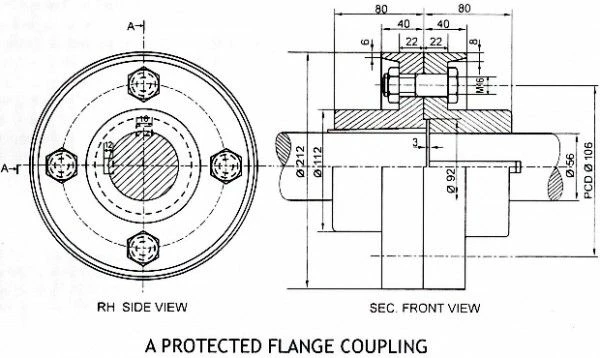
I have a question about section view in Creo Parametric 3.0. I'd like to create section in which some elements (like screws and nuts) are full-visible. E.g. look at the picture below, please.
1.jpg

There's flange coupling where right view is a section but elements like shaft and screw with nut are not hatched. Could you tell me how can I achieve that in Creo 3.0 Drawing?

Thank you in advance for each answer!

Best answer by StephenW

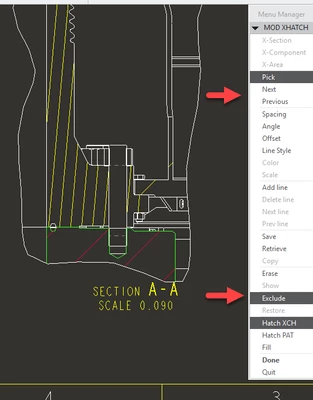
In the drawing view, select the x-hatch and RMB - Properties (or double click the x-hatch).

Use NEXT or PREVIOUS to highlight the component you want to modify the x-hatch on.

Select EXCLUDE for the items you do not want to be sectioned (warning - view doesn't really update until you complete the operation).

Once you get all the items excluded, select DONE to complete the operation, view will update.

StephenWilliams_0-1606908772512.png


1 reply

StephenW23-Emerald IIIAnswer
23-Emerald III
December 2, 2020

In the drawing view, select the x-hatch and RMB - Properties (or double click the x-hatch).

Use NEXT or PREVIOUS to highlight the component you want to modify the x-hatch on.

Select EXCLUDE for the items you do not want to be sectioned (warning - view doesn't really update until you complete the operation).

Once you get all the items excluded, select DONE to complete the operation, view will update.

StephenWilliams_0-1606908772512.png


cadbart1-VisitorAuthor
1-Visitor
December 2, 2020

I've never thought something could be such simple in Creo.. Thank you so much, sir, that really helped!