
2-Explorer
September 4, 2015
Solved

Drawing Title blocks

  • September 4, 2015
  • 9 replies
  • 4376 views

We are changing from Intralink to Creo 2.0 and windchill. i have a couple questions

#1.  can i have the rev block show only the Rev, and not the version.  Rev 1.2.  i want my drawing to say just 1.

#2, the part desctiption, we have a 2 line description,  in the Name field in Windchill, i have PLATE, MAG ACTUATOR

i want it to display on the drawing like

line 1 PLATE

line 2 MAG ACTUATOR.

in Intralink, we input parameters, but i think we can use the Name column in windchill to show in the title block.

thanks for the help.


This thread is inactive and closed by the PTC Community Management Team. If you would like to provide a reply and re-open this thread, please notify the moderator and reference the thread. You may also use "Start a topic" button to ask a new question. Please be sure to include what version of the PTC product you are using so another community member knowledgeable about your version may be able to assist.
Best answer by TomU

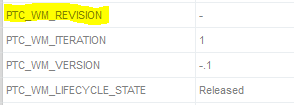
1.)  Yes.  Use the PTC_WM_REVISION parameter.

rev.PNG

2.)  The NAME column in Windchill is nothing more the the PTC_COMMON_NAME in Creo.  It's a single (line) parameter with a max length of 80 characters.  In Creo 3 you can create tables that automatically word wrap, but there is no way to guarantee that the text will wrap where you want.  If you really need two lines you will need two separate parameters.  You could create a custom, single cell repeat region that uses repeat region relations to parse the NAME parameter (at the comma) into two separate repeat region parameters that are then displayed separately in the format.

9 replies

TomU23-Emerald IVAnswer
23-Emerald IV
September 4, 2015

1.)  Yes.  Use the PTC_WM_REVISION parameter.

rev.PNG

2.)  The NAME column in Windchill is nothing more the the PTC_COMMON_NAME in Creo.  It's a single (line) parameter with a max length of 80 characters.  In Creo 3 you can create tables that automatically word wrap, but there is no way to guarantee that the text will wrap where you want.  If you really need two lines you will need two separate parameters.  You could create a custom, single cell repeat region that uses repeat region relations to parse the NAME parameter (at the comma) into two separate repeat region parameters that are then displayed separately in the format.

dgrobe2-ExplorerAuthor
2-Explorer
September 4, 2015

thank you sir.  coming from such old software, we are in a bit of a learning phase, and these are helping a lot.  i hope i dont wear out my welcome with all the questions.

Emeritus
September 8, 2015

Welcome to PTC Community Daniel - there is no limit to the number of questions you can ask 🙂

Best,

Toby

dgrobe2-ExplorerAuthor
2-Explorer
September 4, 2015

one more quick question, even though we have a part as rev 1.2.  is there anyway to have it show as rev 001?

23-Emerald III
September 4, 2015

You will need to modify the revision table that controls the revision sequence.

Off the top of my head I don't know where that it is located.