1-Visitor
January 15, 2020
Question

Dual Dimension Displacing Suffix in Dimension Text

  • January 15, 2020
  • 3 replies
  • 2508 views

Hey, 

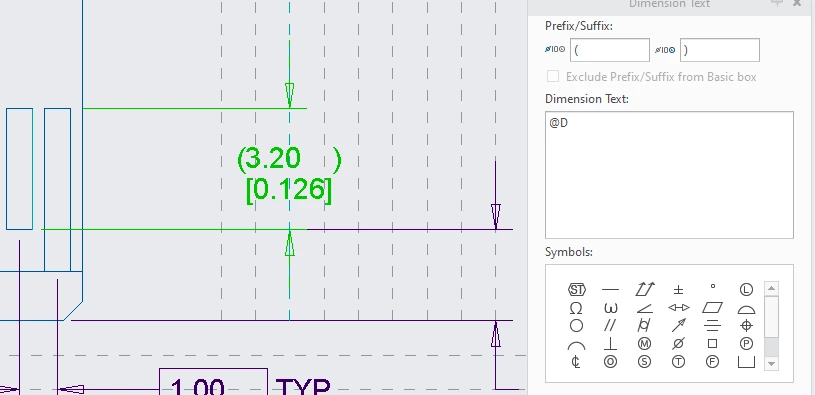
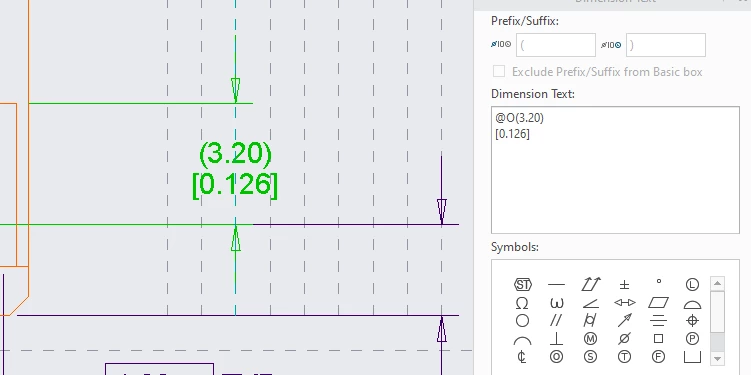
I'm trying to find a way to keep a reference dimensions looking like (3.20) instead of (3.20    ) when I use dual dimensions. The only fix I've found so far is to manually override the dimension, but that's a pretty terrible solution. There should exist a way to prevent this formatting error through the software setting. 

Photo attached below to show what I'm talking about. 

Any advice on this is welcome! 

Thanks! Dual_Dim_good.PNGDual_Dim_error.PNG
3 replies

23-Emerald IV
January 15, 2020
Novus_Tom1-VisitorAuthor
1-Visitor
January 15, 2020

The "Suggest an idea" button is grayed out, so I'm guessing I don't have the right license to use that feature of PTC community. However, this seems more like a bug that needs fixing than a new feature to be added.

24-Ruby III
January 16, 2020

Hi,

I suggest you to report the problem to PTC Support.


From my point of view the problem is related to drawing option dual_dimension_brackets.

1.]

If drawing option dual_dimension_brackets yes is set then extra space is displayed before right parenthesis in primary value. This is because right parenthesis is placed after right bracket displayed in secondary value.

2.]

If drawing option dual_dimension_brackets no is set then brackets are not displayed in secondary value and right parenthesis is placed correctly.


Dale_Rosema
23-Emerald III
23-Emerald III
January 16, 2020