
10-Marble
May 15, 2024
Solved

Duplicate of label, how to locate it?

  • May 15, 2024
  • 2 replies
  • 2075 views

When duplicating a model along with its drawing, I encounter a warning after modifying the part, indicating a duplicate label on the drawing. However, despite searching, I cannot locate the label named "A." Interestingly, the system allows me to add "A," but it appears with a line below it. This suggests that the original "A" may have lost its reference and is not visible on the drawing. Additionally, I cannot find it in the model tree to delete it. How can I resolve this issue or identify the location of the duplicate label?
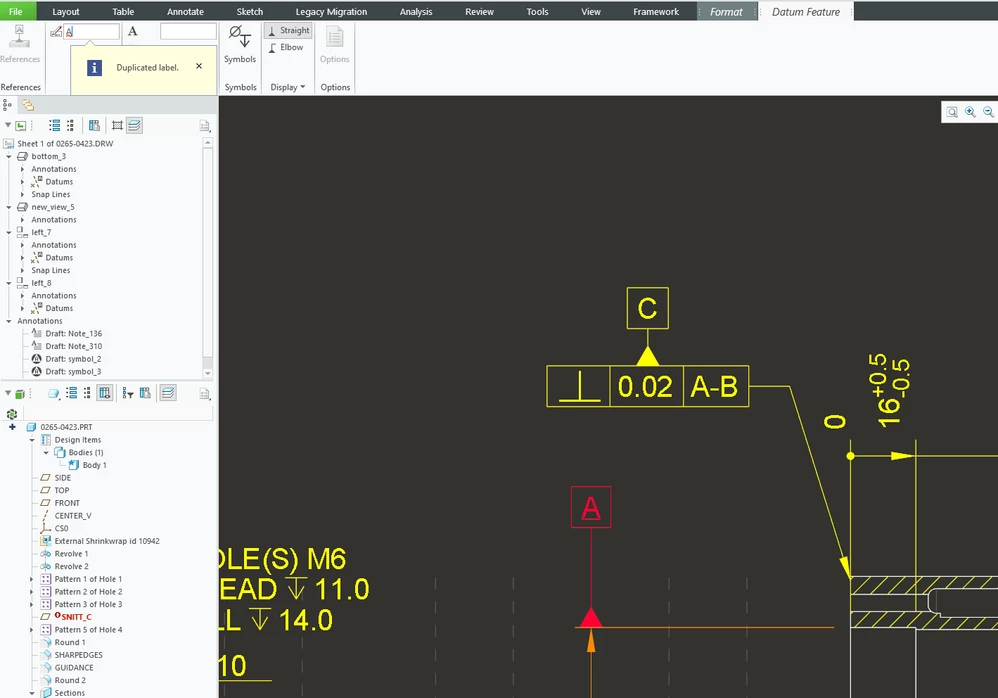

 

image.png

2 replies

KenFarley
21-Topaz II
May 15, 2024

Instead of the model tree, you will want to look through the drawing tree (I think that's what they call it), which is in the side bar above your model tree.

Expand the views and look for another entry with the same name as the one you want to keep, then delete the unwanted one.

StephenW23-Emerald IIIAnswer
23-Emerald III
May 15, 2024
kskatun10-MarbleAuthor
10-Marble
May 15, 2024

Thanks, what else is hidden commands? Hopefully they will fix this in creo 11.

23-Emerald III
May 15, 2024

There are a LOT of hidden options. They are used occasionally to solve specific issues but they really should never be left in your config/drawing setup as a permanent command. In general, they *MAY* cause other unintended issues.


This problem has been around for years, it is unlikely that it will be fixed in that sense. My guess is, there is some sort of "glitch" that is likely associated to legacy data in the model/drawing and any fix overall fix would likely cause other legacy data errors/failures.


Using these update commands are a way to fix the issue and also limit the potential of creating other issues.


Here is a small list of a few of the update drawing options.

https://community.ptc.com/t5/3D-Part-Assembly-Design/Fast-Facts-Quick-Tips-for-Using-PTC-Creo-Drawings-Part-3/m-p/443939