

Question
EFX - Profile cut leaves 'floating' material on far side
Hi,
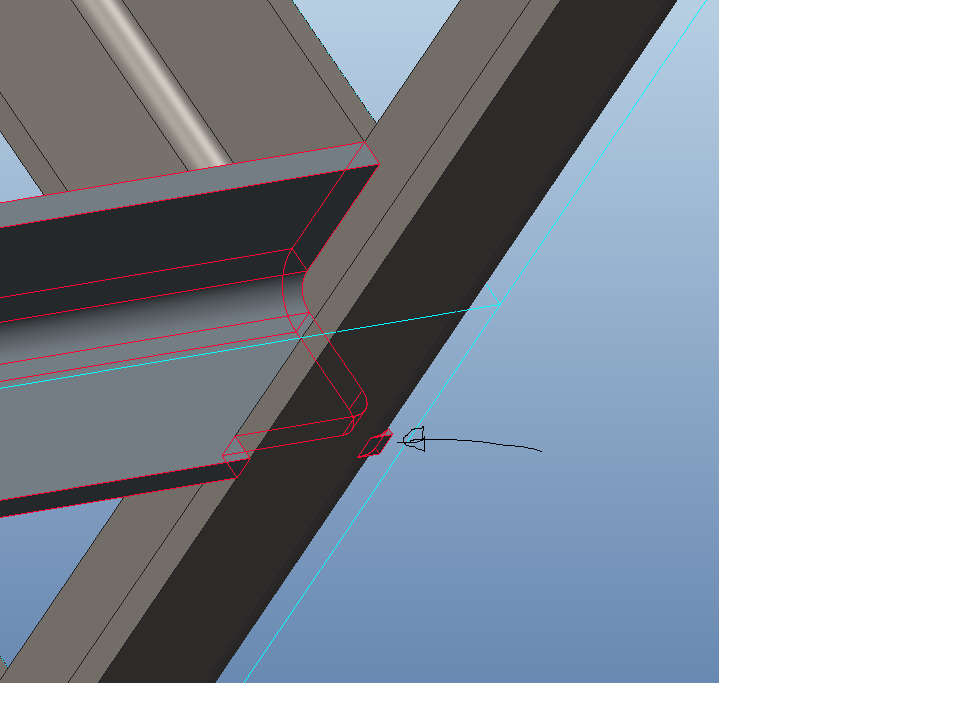
I'm using the EFX tool in Creo 2.0 (build M180) and I'm having the problem when using joints with sheet steel profiles: either a profile cut or overlap t-joint or overlap corner joint results in a floating piece of material on the back of the part (see arrow in image below).
Any advice how I can resolve or work around this?
thanks,
Glyn
This thread is inactive and closed by the PTC Community Management Team. If you would like to provide a reply and re-open this thread, please notify the moderator and reference the thread. You may also use "Start a topic" button to ask a new question. Please be sure to include what version of the PTC product you are using so another community member knowledgeable about your version may be able to assist.