4-Participant
May 16, 2019
Solved

Embedding Sketch

  • May 16, 2019
  • 1 reply
  • 1837 views

Hello, 

I'm a solidworks convert, and is used to drawing a sketch and then making a feature(extrude, revolve) because sometimes halfway through I decided I want to change the feature type and that's how I am used to doing this. Well, new job(mentoring engineers and draftsman) prefers to start with a feature so the used sketch doesn't show up in the model tree. Is there a way to embed the used sketch if I forget and do it the old way. I know it is possible to hide in the model tree but this is not what they want and I'm not going to argue on something like this as its a half dozen or 6 to me. Just trying to keep my self from having to remodel when I forget.


Thanks
Best answer by MartinHanak

Hi,

see following example.

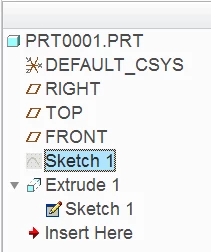
1.] create sketch and extrude related on it, model tree contains following features

mt.png

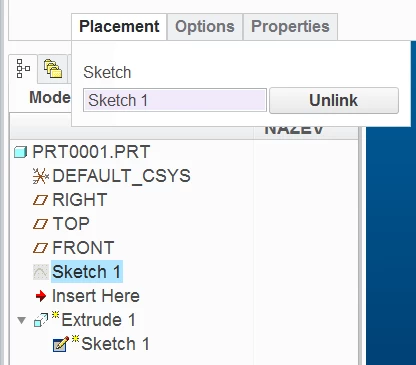
2.] edit extrude definition and click Unlink button, this action breaks relation between sketch and extrude

unlink.png

3.] now you can delete sketch feature

1 reply

24-Ruby III
May 17, 2019

Hi,

see following example.

1.] create sketch and extrude related on it, model tree contains following features

mt.png

2.] edit extrude definition and click Unlink button, this action breaks relation between sketch and extrude

unlink.png

3.] now you can delete sketch feature