
1-Visitor
May 24, 2017
Question

Excessive displacement

  • May 24, 2017
  • 3 replies
  • 19730 views

Hello,

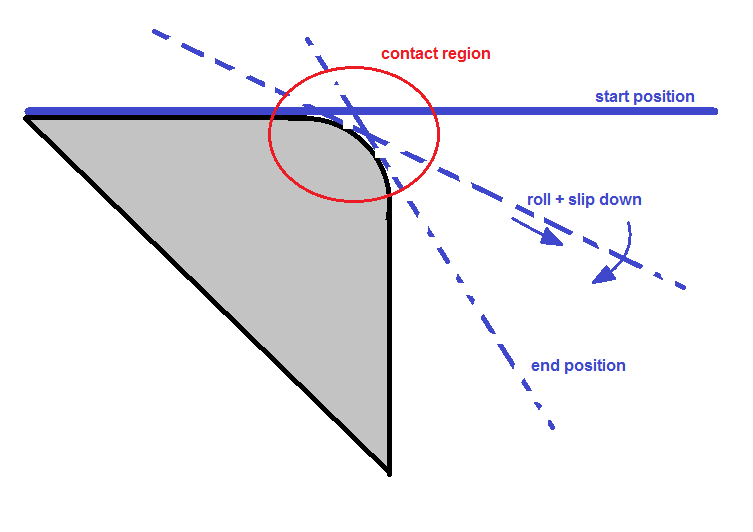
I have a simulation including a stationary body and a moving body. There is a contact between them. I often see the warning: "Excessive displacement at contact region". A software suggests smaller time step but I can not reduce it. The full moving process is described with 100 step and the software does not allow to define more...
cont.png

1. What does it mean exactly the excessive displacement at the contact? Is the time step too large compared to distance between two mesh nodes? If I increase this distance (element size) - instead of time step reduction - is it correct?

2. How can I define more steps under "User define output step"?

Thanks a lot your help;

Roland

3 replies

1-Visitor
May 25, 2017

1.Refine the elements of the contact region and have a try,sometimes it's hard to converge for the solver when the elements are too large.

2.Before it contacts each other,you can give less steps,then you have more steps for the contact steps.

3.You can only define less than 100 steps with a non-linear anaysis.

rrakos1-VisitorAuthor
1-Visitor
May 26, 2017

OK,thanks, I understand. My main problem is the "max 100 time steps". I have a quite long moving process and I should divide the full process to small steps but the 100 step possibility is not enough for me...

skunks
19-Tanzanite
May 26, 2017

Roland,

i recommend: MSC MARC

creo simulate ist not possible in this case

regards

paul

1-Visitor
May 27, 2017

Creo can do this large deformation analysis(below),so I think your question in not a problem.

skunks
19-Tanzanite
May 27, 2017

Hi,

his problem is plasticity and contact and large deformation.

regards

paul

ps:

contact+large deformation: OK (example attached)

contact+plasticity: OK (example attached)

contact+plasticity+large deformation: not possible

rrakos1-VisitorAuthor
1-Visitor
May 29, 2017

My task is very similar to your 2. example (contact AND large deformation). But my model includes plasticity.

pic_01.png

As far as I see, the main problem is that the time step has to be small because the parts are in contact continuosly. There is no a range during the motion process where the time step can be increased because the calculation will diverge in this range...

Second problem is that I has to calculate the backway of blue part. So my motion function (y in time):

pic_02.png

I would like ot investigate the final state, after the springback. If the time step is large after the maximal y then the contact will not be correct. Finally, I should divide this full timerange to 100 steps and it seems to me that it is inpossible with correct time step size...

skunks
19-Tanzanite
May 30, 2017

OK,

example attached (contact, large deformation and plasticity).

bending_all.jpg

rrakos1-VisitorAuthor
1-Visitor
May 30, 2017

OK, it is a perfect example. My testcase includes plus 2 additional problems:

- the motion (down) is more higher so the plastic deformation is more larger too

- it should be modeled the backway of rod (to see the backspring) so I need additional time step but the 100 is not enough

The simulation is ok with 4mm displacement but the 8mm...

pic_03.png

skunks
19-Tanzanite
May 31, 2017

Hm,

i think it's a problem of force maybe:

problem.JPG

better 2D-Analysis with MSC MARC

regards

paul