
1-Visitor
September 12, 2013
Question

Exploded Detail Views / Center Align Dimension Text in Drawings

  • September 12, 2013
  • 1 reply
  • 2408 views

Hi all,


Is it possible to explode detail views? I'm trying to make my angle dimensions easier to read.


Also, is there a way to center the text for my diameter dimensions? For some reason the text shifts up.
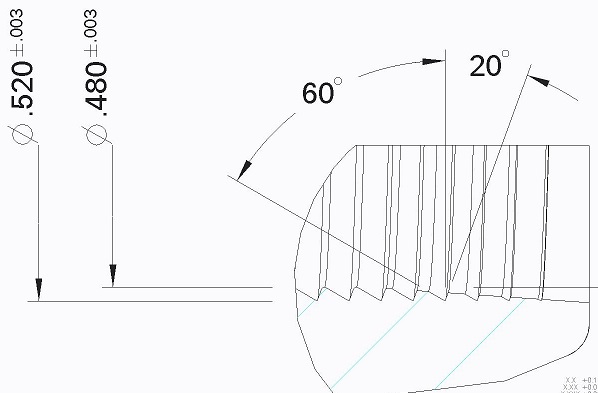
 

llll.jpg


Thanks,

Kaci


This thread is inactive and closed by the PTC Community Management Team. If you would like to provide a reply and re-open this thread, please notify the moderator and reference the thread. You may also use "Start a topic" button to ask a new question. Please be sure to include what version of the PTC product you are using so another community member knowledgeable about your version may be able to assist.

1 reply

Dale_Rosema
23-Emerald III
September 12, 2013

Kaci,

I am not sure what you mean by explode. If you mean converting it to line entities, I highly recommend that you do not do this in that you will loose any functionality of updating the view.

If you mean enlarge the view. There is still a little ambiguity. Do you want to change the scale to make it larger? Do you want to redifene what you see in the view so that you can see more details. These are two completely different things. Could you clarify what you are looking for?

Thanks, Dale

1-Visitor
September 12, 2013

Hi Dale,

I just need the thread detail lines that are blending in with my angle dims 60 and 20 to be lighter or not shown at all.

- Kaci

17-Peridot
September 12, 2013

You can change style or blank model lines in drawings. However, you can easily fix this by moving the angle dimension below the view instead. You can also use little "extensions" at the apex. This is an all too common challenge for drafters where tweaking the model image is the last resort.