

tbraxton
22-Sapphire II
22-Sapphire II
August 16, 2022
Solved

Export of Creo part is successful but is devoid of any geometry

  • August 16, 2022
  • 4 replies
  • 8344 views

I have a part model that is solid geometry. When exporting the part using STEP it generates the file but the STEP file does not contain any geometry when imported.


The part does not have any geometry checks and has absolute accuracy (1E-4 inches) set in Creo 7.07. The geometry is not what I would call complex.


I have been able to get around this issue by saving the part as a Creo neutral file, opening it as a part and then exporting it as STEP. This process yields accurate geometry in the STEP export.


The source part file will not export to STL either but there is no diagnostic info on bad geometry. Typically this would identify are where tessellation failed.


Has anyone else encountered this issue?
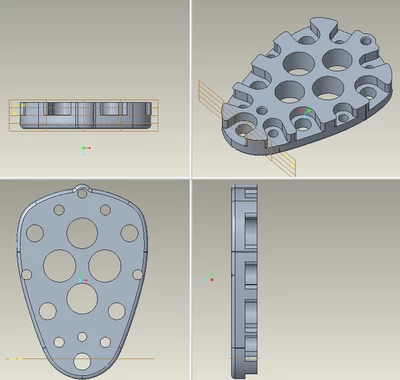
 

tbraxton_0-1660651035062.png


Best answer by tbraxton

I had an external vendor test this part for export and they got the same error as I did in a different environment and without any input from me other than to save it to a STEP file.


I have finally found the root cause (operator error). I was using a STEP profile that excluded construction bodies. This is a feature of multi body functionality introduced in Creo 7. 


In some circumstances Creo will convert a body to a construction body without user input. That is what happened here. I was excluding construction bodies from the STEP export.


When replaying the model the only body in the part is changed to a construction body when an external copy geom feature is added to the model. This happens with no message on the command line or other notice. I found it by adding body display to the model tree and watching the icon change indicating the switch to a construction body. You can only observe this with the body icon expanded.

4 replies

21-Topaz I
August 16, 2022

Creo opens empty when opening the STEP export of the above part. It is surprising indeed as the geometry is mainly prismatic.


Can you clarify the below:

  1. what protocol do you export to?
  2. is the STEP file of size 0 ko?
  3. what does the content look like when you edit the step file with notepad?
  4. by change have you ever tried STEP Analyzer? STEP File Analyzer and Viewer | NIST it is an agnostic STEP tool used as a controling tool.
  5. when importing the STEP file, do you include a template? if yes have you tried without it?
Patriot_1776
22-Sapphire II
August 16, 2022

Weird.  Is it a file created in Creo, or is it imported?  Does it give you a mass when you do a mass properties?  If it's an imported file, and you have Solidworks, import it into that, "fix" it there, and export it as a STEP.  I'm guessing here because I'm stuck on Creo 4....until I switch to Creo 8 in the next couple weeks.

tbraxton
22-Sapphire II
tbraxton22-Sapphire IIAuthor
22-Sapphire II
August 16, 2022

The part file is native Creo geometry created in Creo 7, it does use a copy geom driven by an external reference.

The Creo part reports accurate mass when measured in part mode.


I have tried the following STEP protocols exporting solid geometry only.

ap203 is

ap214

ap242


STEP file sizes are not=0 but are small i.e. 14Kb & 250 lines


Warning message upon opening STEP file in Creo as a part:

Could not construct feature geometry.


Patriot_1776
22-Sapphire II
August 16, 2022

The copy geom may be screwing things up.  Can you delete it or suppress it before making a STEP, or does the Creo geometry reference the copy geom and will fail if you do either?

kdirth
21-Topaz I
21-Topaz I
August 16, 2022

Differences in model accuracy between the model and the inherited model have caused issues for me in the past.

There is always more to learn.
tbraxton
22-Sapphire II
tbraxton22-Sapphire IIAuthor
22-Sapphire II
August 16, 2022

All absolute accuracy values are the same among all of the parts as they should be in this context.

tbraxton
22-Sapphire II
tbraxton22-Sapphire IIAuthorAnswer
22-Sapphire II
August 17, 2022

I had an external vendor test this part for export and they got the same error as I did in a different environment and without any input from me other than to save it to a STEP file.


I have finally found the root cause (operator error). I was using a STEP profile that excluded construction bodies. This is a feature of multi body functionality introduced in Creo 7. 


In some circumstances Creo will convert a body to a construction body without user input. That is what happened here. I was excluding construction bodies from the STEP export.


When replaying the model the only body in the part is changed to a construction body when an external copy geom feature is added to the model. This happens with no message on the command line or other notice. I found it by adding body display to the model tree and watching the icon change indicating the switch to a construction body. You can only observe this with the body icon expanded.

Dale_Rosema
23-Emerald III
23-Emerald III
August 17, 2022

WOW! Good to know for future use.