Dale_Rosema
23-Emerald III
23-Emerald III
March 6, 2020
Solved

Exporting a step file but also getting all the hidden trim surfaces

  • March 6, 2020
  • 2 replies
  • 3026 views

While exporting some step files and then importing them, all the extra trim surface that are hidden are coming along with the part. This doesn't work when you are trying to render some parts. Is there a way to have these extra surface remove during the creation of a step file?
Best answer by Dale_Rosema

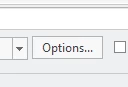
When exporting a .stp file. Click on the Options button 

Dale_Rosema_0-1583506526390.png


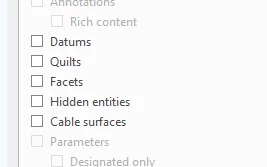
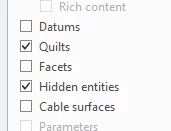
Then uncheck the quilts and hidden entities

Dale_Rosema_1-1583506591898.png     Dale_Rosema_2-1583506615156.png


If I save profile, it want to add "def_profile.dep_step"

Where is this file normally located.


This does remove all the extra surface.


2 replies

Mahesh_Sharma
22-Sapphire I
March 6, 2020

@Dale_Rosema


I think Tom's reply to this post will help you. 

Dale_Rosema
23-Emerald III
Dale_Rosema23-Emerald IIIAuthorAnswer
23-Emerald III
March 6, 2020

When exporting a .stp file. Click on the Options button 

Dale_Rosema_0-1583506526390.png


Then uncheck the quilts and hidden entities

Dale_Rosema_1-1583506591898.png     Dale_Rosema_2-1583506615156.png


If I save profile, it want to add "def_profile.dep_step"

Where is this file normally located.


This does remove all the extra surface.


Mahesh_Sharma
22-Sapphire I
March 6, 2020

You can save that to any location and set export_profiles_step to read profiles from that directory.