
1-Visitor
February 24, 2016
Solved

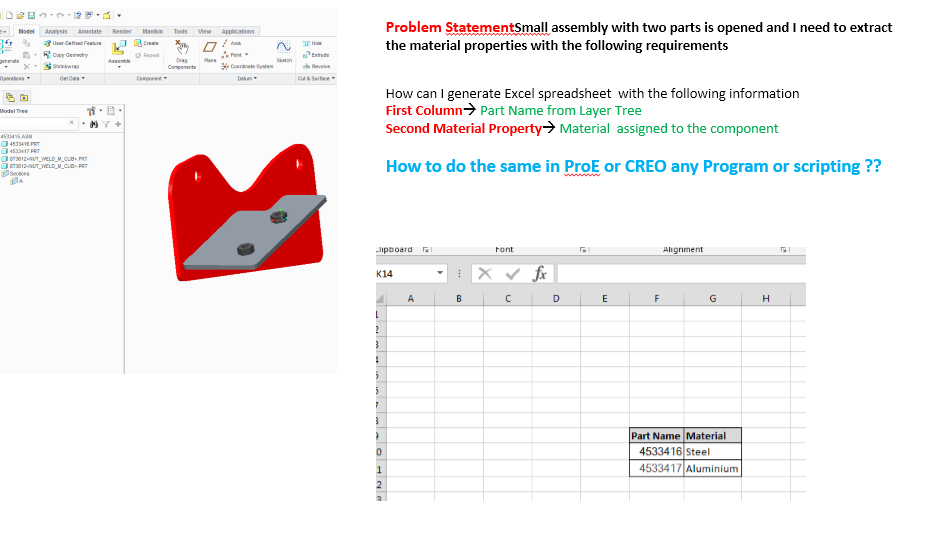
extract material properties
  • February 24, 2016
  • 5 replies
  • 2925 views

Problem in Proe.PNG


This thread is inactive and closed by the PTC Community Management Team. If you would like to provide a reply and re-open this thread, please notify the moderator and reference the thread. You may also use "Start a topic" button to ask a new question. Please be sure to include what version of the PTC product you are using so another community member knowledgeable about your version may be able to assist.
Best answer by sr-4
Hi

Thank you so much . It is working Perfectly 100%

Thanks a lot

Srini

5 replies

24-Ruby III
February 24, 2016

Hi,

you can:

  • create auxiliary drawing containing with your assembly set as drawing model
  • create table with repeat region in the drawing
  • 1st column ... &asm.mbr.name
  • 2nd column ... &asm.mbr.ptc_material.PTC_MATERIAL_NAME
  • select the table and save it as csv file
  • change csv file name extension to txt
  • open txt file in Excel and save it as xls file

MH


sr-41-VisitorAuthor
1-Visitor
February 24, 2016

Hi Martin

Thank you so much for your Reply.

I am really looking to generate an text file or CSV file from  Creo  without going into the drawing information.

Say  I have 20 parts in my active window under one assembly with the tree window on left side.

I am looking a script or procedure to generate a txt or csv file t have part number in forst colum and material properties in the second coulmn.

The reason I am asking this question is used use for my simulation using external solvers.

Thank you


24-Ruby III
February 24, 2016

Hi,

you can also configure Model Tree to show PTC_MATERIAL_NAME parameter in its column and use Save Model Tree command.

MH