6-Contributor
April 14, 2023
Question

Face in two

  • April 14, 2023
  • 1 reply
  • 2451 views

I would like to know if there is a way to avoid Creo splitting a surface into two surfaces (see picture)
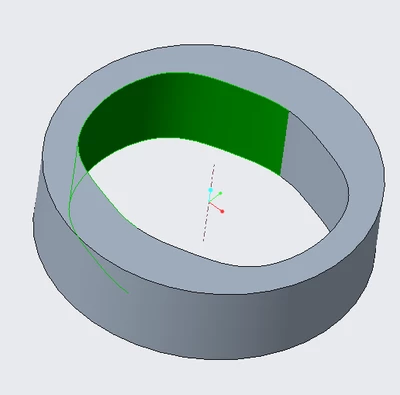
liz68_0-1681477549389.png

In this case, I created the outer geometry and subtracted the material in the middle.



1 reply

tbraxton
22-Sapphire II
April 14, 2023
Maybe. Post the model or explain the connection about the symmetry plane of the inner cut. It appears there is a dihedral angle where they meet at the symmetry plane.
liz686-ContributorAuthor
6-Contributor
April 14, 2023

Hi tbraxton,


I've imported a table of datum points to create a curve (in green), and used the curve to cut the geometry:

liz68_0-1681481046904.png

liz68_1-1681481141474.png

I mean, the same thing happens when I cut it with a circle:

liz68_3-1681481430518.png


why does Creo do this?


Dale_Rosema
23-Emerald III
April 14, 2023

Cylinders in Creo have always been split in two.

Though I am not certain of the reasoning, I sure there is a logic answer from a programming standpoint.