Few 2D ECAD parts missing - not importing correctly
Using CREO 4.0 M120: CREO is not importing correctly some 2D components exported from Allegro Cadence V17.2. Few 2D components are missing. (They do have height attributes.).
When exported from Allegro, export geometry looked fine on Allegro’s end but when imported into CREO, all the components using for ex, RES_0402_CUST didn’t read in and there were NO error messages. ( There was mention of an ecad log file, but we couldn’t locate this ecad log file at first. Later when we tried again, the ECAD log file was generated showing error bringing in these certain components.)
We later ran test on this. We did get an error asking if we wanted CREO to try to sketch/create geom. We went with yes, it did and created a sketch but still did not show up in model. We also tested it again saying no to try to sketch model, same thing and there was no error message after this saying the component still didn't read in.
Later the same exact files were read in again but in between this geometry was created in CREO. Because the geometries were created in CREO library, the components read in fine.
We then tried to create a copy of this slightly weird RES_0402_CUST (it’s slightly weird because the corners are not 90 degrees. There are very tiny miters, cutouts in each corner.) We renamed this new part test something. We then placed it and went to see if this read into board. It didn’t.
Below is a sample test board assembly in Allegro Cadence R6 is the new copied 2D that is not in CREO library
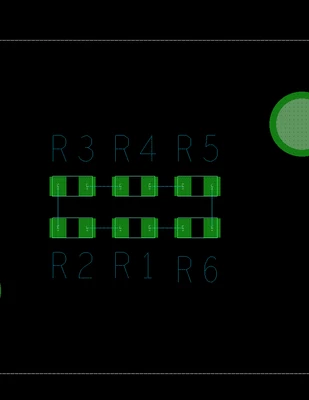
When imported the files into CREO. It warned that the geometry is missing. CREO gave option to try to sketch build or not. We tried both options.
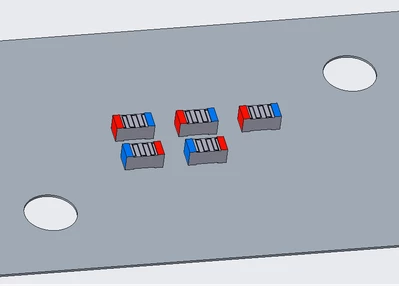
What came up was this. (See below. ) R6,the copied 2D RES geometry,is missing but had no message coming up missing. We had to dig into ecad log file to see there was a problem. We’re seeing cases where there are 2D being created no problem, but a few 2D are not being created. Has anyone else experience this issue?
Any suggestions?
Thank you