

tbraxton
22-Sapphire II
22-Sapphire II
September 16, 2020
Solved

Fill pattern using curve option; unexpected results

  • September 16, 2020
  • 2 replies
  • 9521 views

The example here is a simplification of an issue with a complex model. When using the fill pattern with curve grid type I am not able to evenly distribute points along a closed curve.


I have posted a sample model (Creo 4) with two pattern features spaced along the curve symmetrically about a symmetry plane. On the left is a dimension pattern which works fine and is based on the pattern leader being on the symmetry plane.


A measure feature is used to get the curve length and then a relation to calculate the spacing needed for distribution.


Using the fill pattern I can not replicate this desired distribution of points. I have tried alternate start points but it does not yield the desired result. Can anyone offer insight into why? Using a start point in the fill pattern that is on the mirror plane causes the next pattern member after the leader to be placed in the opposite direction of the subsequent members.


I have been able to use the fill pattern curve grid to get the distribution but only by creating two patterns using half the drive curve and then deleting the last pattern member to avoid duplication. This is not ideal and I would like to be able to fill a closed curve with points evenly placed on the curve in a single pattern.
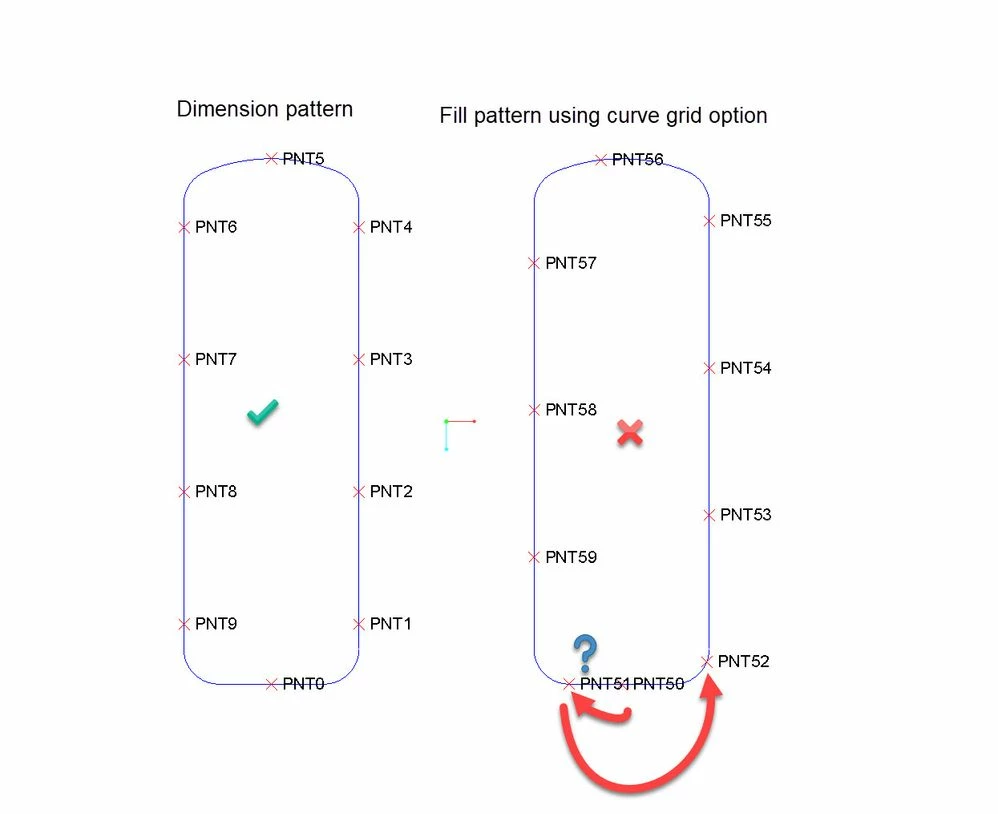
 

Pattern results comparedPattern results compared


Best answer by tbraxton

It has taken a while to get an answer from PTC development.

"...the instances of Fill Pattern created along the curve are placed at the given spacing as per the Grid orientation, which is same as default CSYS orientation.  We do not allow to change the grid orientation in case if Along the Sketched curve grid template is selected for Fill type of Patterns.  It is not correct to expect the equal spacing of instances along any shape of the curve in case of Fill Pattern."


The best workflow in this situation is using Dimension or Curve type of Pattern.  In order to get the same result in case of Curve Pattern, user has to switch the Pattern option to Curve, convert the external Sketch to Internal and edit the Sketch to align the start point and location of lead member.  Then edit the relation to use the respective spacing dimension id. Refer to the video below for how to use a curve pattern to get the desired result.

2 replies

19-Tanzanite
September 19, 2020

There's something weird about that kind of a fill pattern, but it also highlight's the software's limitations in how points along closed sketched curves are defined.
I mean, there is missing UI here as how to allow the user to designate a vertex in the sketch curve chain as the start point - the kind when you edit the sweep cross-section (there you can locate the start point at any vertex by dragging it along the curve)


So if you are trying to form a linear pattern of evenly spaced instances, I think you can only way to get the "right" results with the fill-curve pattern is if the point being patterned is defined as being on an open curve - and at its "other" end.  And also, it should be suppressed (omitted) from the pattern!

Also, the relations are more complicated.  Anyway, summary of my Pro/WorkAround attached.

tbraxton
22-Sapphire II
tbraxton22-Sapphire IIAuthor
22-Sapphire II
September 21, 2020

That is another workaround method that allows for using the fill pattern. It would seem that the fill pattern curve option was not intended to be used on closed curves but I don't see anything in the help files that deals with this situation.

1-Visitor
September 22, 2020

Try this...

After creating initial curve, select item to pattern but, when you select pattern along curve, re-create the sketch by projection within the pattern. This also will allow you to control the start point along the curve.

tbraxton
22-Sapphire II
tbraxton22-Sapphire IIAuthorAnswer
22-Sapphire II
October 26, 2020

It has taken a while to get an answer from PTC development.

"...the instances of Fill Pattern created along the curve are placed at the given spacing as per the Grid orientation, which is same as default CSYS orientation.  We do not allow to change the grid orientation in case if Along the Sketched curve grid template is selected for Fill type of Patterns.  It is not correct to expect the equal spacing of instances along any shape of the curve in case of Fill Pattern."


The best workflow in this situation is using Dimension or Curve type of Pattern.  In order to get the same result in case of Curve Pattern, user has to switch the Pattern option to Curve, convert the external Sketch to Internal and edit the Sketch to align the start point and location of lead member.  Then edit the relation to use the respective spacing dimension id. Refer to the video below for how to use a curve pattern to get the desired result.

1-Visitor
December 4, 2020

Hi tbraxton, try this method:
1) I create a new sketch by projection the existing sketch with "chain" by selecting first the lower right and then left segment (or vice versa) in order to define the starting point between the two segments.
2) select sketch (1) and create point with 0 offset ratio
3) I create a fill pattern deleting the first pattern member to avoid duplication.