15-Moonstone
April 12, 2023
Solved

Filling welding problem

  • April 12, 2023
  • 1 reply
  • 2363 views

Hi,
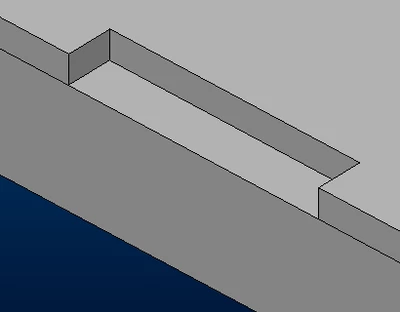
I wish I could represent a weld to completely fill this opening.
I tried to use plug/Slot Weld but the feature doesn't work for me.

bmancini_0-1681314044088.png

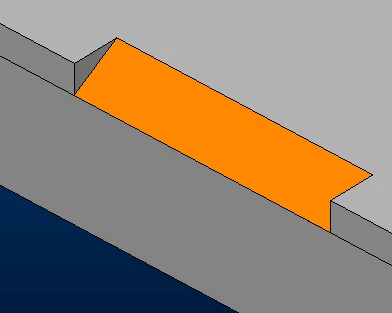
At best I can get a fillet weld this way but it's not exactly what I'm looking for.

bmancini_2-1681314066045.png

Can anyone help me?

P.S. I'm using Creo 9.0.2.0

Best answer by bmancini

I found a solution by myself.
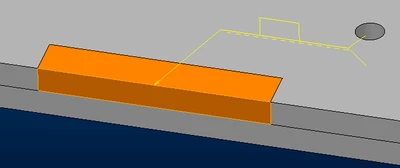
bmancini_0-1681480634398.png

This is the procedure i defined:

- Open the part with the opening.
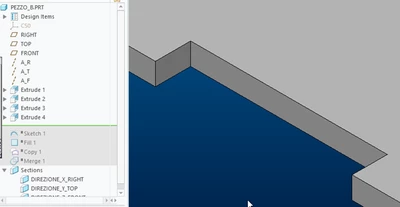
bmancini_2-1681481888535.png

- Create a curve and fill it to create a closing surface of the opening.
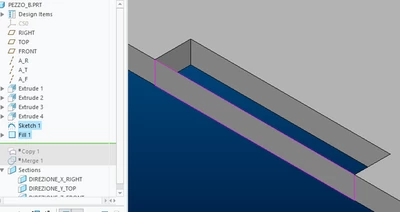
bmancini_4-1681481909926.png

- Select the three faces of the opening and press CTRL+C and CTRL+V to create a copy of surfaces.
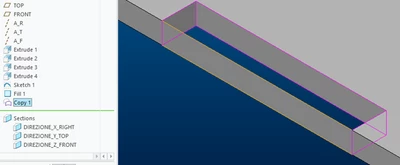
bmancini_5-1681482028696.png

- Select the fill feature and the surface copy and merge them with the "Merge" command.
N.B. In order for the next "Slot/Plug Weld" to be created, the surface copy feature must appear before the fill feature.
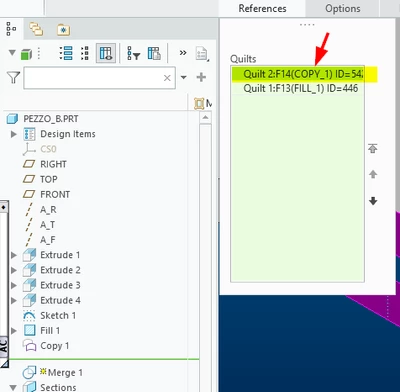
bmancini_6-1681482088483.png

Otherwise the weld will not be created and this error message will appear: 
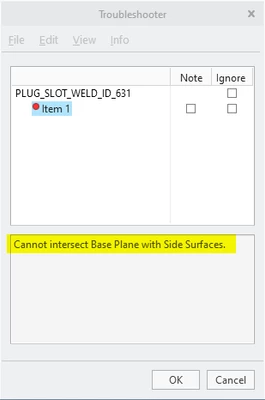
bmancini_8-1681482237285.png

- Open the asm, create the "slot/plug welding" by first selecting the base and then the side surfaces previously created.


If anyone else has a better solution to point me to, I'd be very happy.

1 reply

bmancini15-MoonstoneAuthorAnswer
15-Moonstone
April 14, 2023

I found a solution by myself.

bmancini_0-1681480634398.png

This is the procedure i defined:

- Open the part with the opening.

bmancini_2-1681481888535.png

- Create a curve and fill it to create a closing surface of the opening.

bmancini_4-1681481909926.png

- Select the three faces of the opening and press CTRL+C and CTRL+V to create a copy of surfaces.

bmancini_5-1681482028696.png

- Select the fill feature and the surface copy and merge them with the "Merge" command.
N.B. In order for the next "Slot/Plug Weld" to be created, the surface copy feature must appear before the fill feature.

bmancini_6-1681482088483.png

Otherwise the weld will not be created and this error message will appear: 

bmancini_8-1681482237285.png

- Open the asm, create the "slot/plug welding" by first selecting the base and then the side surfaces previously created.


If anyone else has a better solution to point me to, I'd be very happy.

23-Emerald III
April 14, 2023

Aside from creo welding, in the real world, what are your intentions with this weld?  Are you really looking for that shape? I wouldn't like it as a welder. 

I understand that sometimes we do stuff that isn't easy but it's necessary.


***EDIT-I'm not a welder, I have made some welds before...100% of them have been removed and replaced by a qualified welder!!!***😂

bmancini15-MoonstoneAuthor
15-Moonstone
April 14, 2023

But that's exactly what I'm actually looking for.
In some assemblies made with interlocking laser-cut plates, we need to create these cavities to then be filled with welding and ground smooth.
We usually fit sheet metal with thicknesses not exceeding 4mm, so these cavities have a maximum section of 4mm x 4mm, which I think is not too much to be filled and ground smooth.

N.B. I'm new to solder symbology, which solder/symbol should I use?
Reviewing the symbol I think the most suitable is this one where I added the smooth finish.

bmancini_0-1681484553461.png