
1-Visitor
July 30, 2025
Solved

Fin Geometry

  • July 30, 2025
  • 2 replies
  • 425 views

Hello,


I am trying to make a fix for a turbine with some complex geometry in Creo 10.0. I don't want to just sketch a shape and extrude it, but rather I am trying to get it to follow a curve. This feels like it should be easy, but I am struggling with it. This is the shape and that is the type of curve I want it to follow. What is the best way to accomplish this.
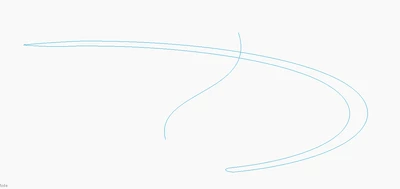

JP_13928769_0-1753887536534.png


Best answer by tbraxton

A variable section sweep will support a varying section and orientation along the sweep trajectory(ies). Without a complete understanding of the required geometry, it is a guess to suggest solutions. You may need to use trajpar in a relation within the VSS (var section sweep) to get the geometry.


This is a video series dealing with VSS feature creation:

https://www.youtube.com/watch?v=iniFqbqClQg&t=4s 

2 replies

tbraxton
22-Sapphire II
tbraxton22-Sapphire IIAnswer
22-Sapphire II
July 30, 2025

A variable section sweep will support a varying section and orientation along the sweep trajectory(ies). Without a complete understanding of the required geometry, it is a guess to suggest solutions. You may need to use trajpar in a relation within the VSS (var section sweep) to get the geometry.


This is a video series dealing with VSS feature creation:

https://www.youtube.com/watch?v=iniFqbqClQg&t=4s 

kdirth
21-Topaz I
21-Topaz I
July 30, 2025

Something like this:

kdirth_0-1753890572996.png

A simple sweep following the "spine" curve with a sketch of the cross section. 


Multiple trajectories, relations using trajpar, and swept blend can be used to control angles, rotation, cross section, etc. to get the desired shape depending on your requirements.

There is always more to learn.