
17-Peridot
July 27, 2010
Solved

For me, it's a bit complicated things.

  • July 27, 2010
  • 1 reply
  • 4563 views

Hi all

Here is a drawing which called feeding body.How to create it into 3D model?

Be grateful!


This thread is inactive and closed by the PTC Community Management Team. If you would like to provide a reply and re-open this thread, please notify the moderator and reference the thread. You may also use "Start a topic" button to ask a new question. Please be sure to include what version of the PTC product you are using so another community member knowledgeable about your version may be able to assist.
Best answer by DavidButz

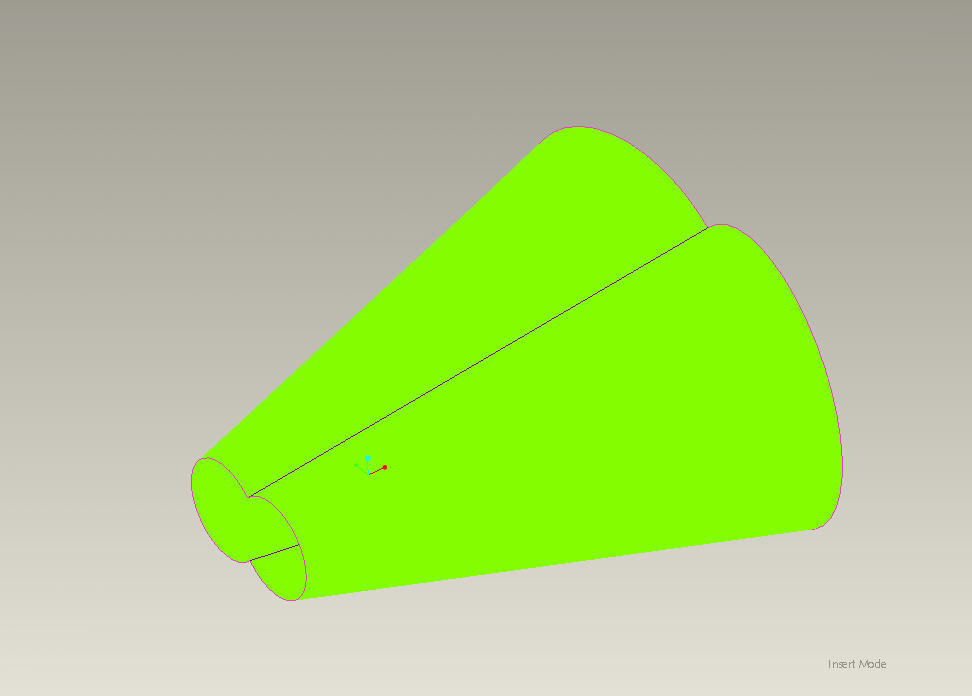
I think you would be better off using 2 revolved conical surfaces rather than a boundary blend as illustrated by a comparison of your curvature plot and the following:

shaded-curvature.jpg

It appears that you have created a blend from the angled edges at the large end to the coplanar edges at the small end; this is going to produce a slight departure from truly conical surfaces as illustrated by your shaded plot. This is critical for your design because you have a conical auger rotating inside. Furthermore, it's likely that you would have trouble converting what you have into an acceptably simple model for rolling the sheet metal into cones.

1 reply

1-Visitor
July 27, 2010

This forum really isn't the place for us to do full designs for each other. However, looking quickly at your geometry, maybe a couple of snapshots will help you get started.

feeder_1.jpg

Create Axis A_1 through DTM1 & DTM2, DTM4 through A_1 at an angle to DTM1, A_2 through DTM4 & DTM3, revolved surface on DTM4, mirror about DTM2, and Merge the two surfaces.

1-Visitor
July 27, 2010

Merge, then Thicken.

feeder_2.jpg

bduncan17-PeridotAuthor
17-Peridot
September 26, 2010

Would you like share the modle with me ?