
10-Marble
September 11, 2024
Question

Formula driven Lattices to orient on curved surface

  • September 11, 2024
  • 3 replies
  • 3194 views

Dear PTC-Community,


I want to replace a section of a part with formula driven lattices (Gyroid in the example case).

I also want to try out different shapes for the section to be replaced and have the same surface for each version.

In the three examples below, the shape and position of the section to be replaced is slightly different.
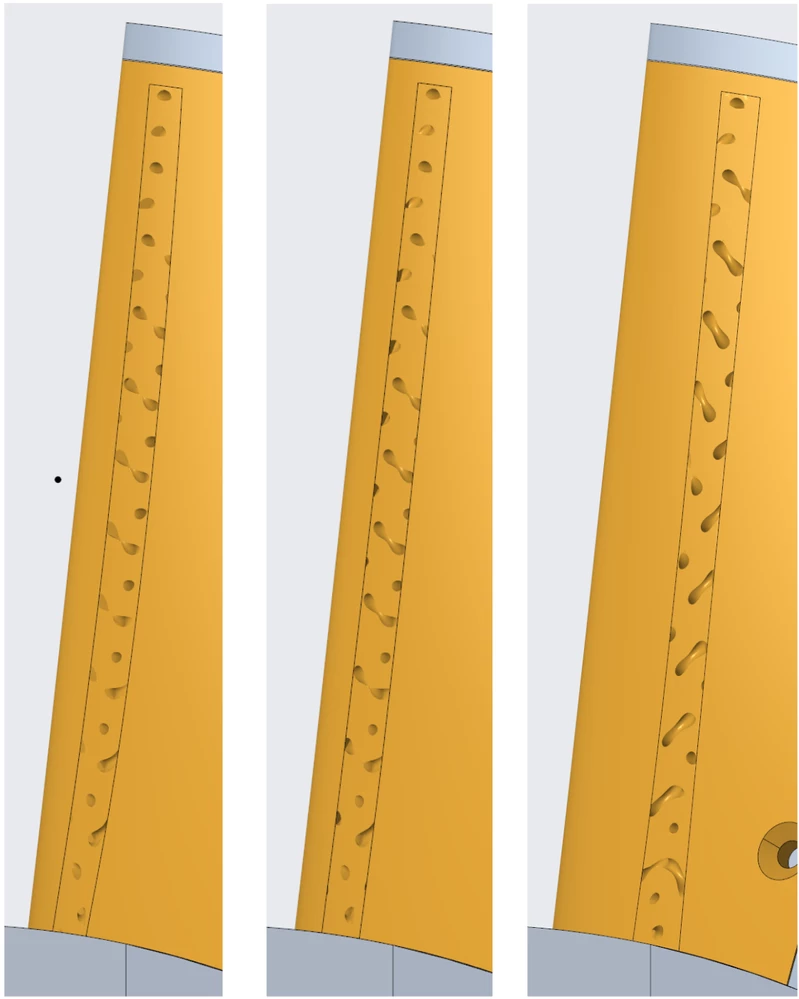
Different versions of slots going trough the partDifferent versions of slots going trough the part


For each case, I am placing the first unit cell in the top left corner and orient it along the slot as shown here:
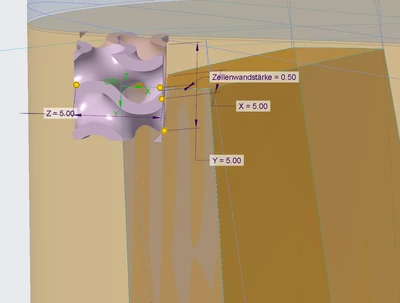
Unit Cell orientation and placementUnit Cell orientation and placement


I understand that as the Part is wound in space and does not consist of a straight surface, the unit cell gets "cut" in a different way depending on the position of the part to be replaced on the surface.


Is there is a way to get the same surface for all three different positions? To have the unit cell align itself on a curved surface so to say.


What I did try was to create a cuboid, replace it with lattices and then bend the cuboid manually to conform to the surface. The results were not statisfying.


I hope I am being clear enough with my explanation, if I missed any information please feel free to ask. I am using Creo parametric 9.


All the best and thank you for reading

Garbean

3 replies

16-Pearl
September 14, 2024
Garbean10-MarbleAuthor
10-Marble
September 17, 2024

Thank you for suggesting this. I will try it out.

16-Pearl
September 17, 2024

Hi @Garbean 

Can you share your model, or a simplified model that demonstrates your need?

16-Pearl
September 14, 2024

Try using non 2d cell based lattices like stochastic beams. You can assign a shell value in surfaces too. 

Garbean10-MarbleAuthor
10-Marble
September 17, 2024

Thank you Michael for your suggestion. How would I go about assigning that shell value in surfaces?

16-Pearl
September 17, 2024

Set the Shell Thickness in the lattice tool itself. This controls the thickness of the outer shell that surrounds the lattice structure. The shell will typically follow the outer surfaces of the model while the lattice fills the interior volume.

Community Moderator
October 7, 2024

Hi @GS_01_11827124,


I wanted to see if you got the help you needed.

If so, please mark the appropriate reply as the Accepted Solution. It will help other members who may have the same question.
Of course, if you have more to share on your issue, please pursue the conversation. 


Thanks,
Anurag 

Garbean10-MarbleAuthor
10-Marble
October 14, 2024

Hello Anursingh,


in my particular case, there does not seem to be a solution.


Regards

Garbean