
19-Tanzanite
September 24, 2022
Solved

GD&T advisor

  • September 24, 2022
  • 1 reply
  • 2056 views

I was wondering about the GD&T advisor extension after seeing this pop up when I started my Creo session:

pausob_0-1664056309039.png

Looks like I missed the webcast.  Usually the resource center isn't displayed at startup for me, but today I was borrowing a license so my startup script was bypassed.

Anyway, seems to me that the underlined callout is nonsense - I assume that the screenshot was created by someone in the marketing department who was not paying attention to the content.


So would the GD&T advisor flag such "errors"?  In this case, I am curious if the surface that defines the datum "A" is tagged, and so then when applying a control to it specifies its position with regard to datum "A", the system would alert the user, or flag this kind of a circular reference error with an underline or an exclamation mark icon.

Best answer by Mfridman

Hi @pausob 

You are absolutely right. this GD&T callout is not proper and was mistakenly used in that way.

That being said, it allows this discussion about GD&T Advisor, which indeed can flag those kind of mistakes and help the user in applying its GD&T correctly.


My assumption is that the GD&T annotations on this model were not applied using the GD&T Advisor tool, because the tool will not allow such a creation in the first place.

However if you have such a design with existing annotations, you can run GD&T Advisor and validate the existing annotations (the validation of existing annotations is part of the GD&T Advisor Advanced license).

When you do this, GD&T Advisor will immediately flag those kind of mistakes and will also suggest you a proper GD&T characteristic if you will edit the feature.


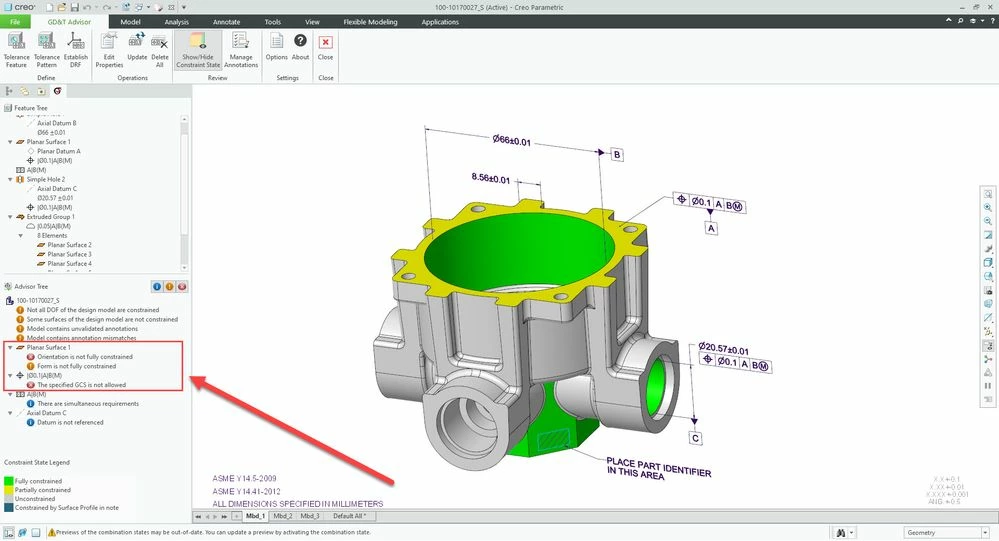
I have managed to track down this model and ran GD&T Advisor on it, this is the result after the validation:

GDTA_Case.jpg 


Using the color constraint mode I am able to better visualize which surfaces are partially/fully constraint and make the necessary adjustments.

I can also find many errors that I need to fix in order to have correct GD&T which will fully constraint the model and will comply to the detailing standards.


Thank you for raising this point


Best Regards, 

Michael Fridman

PTC Product Manager 

1 reply

Mfridman16-PearlAnswer
16-Pearl
September 25, 2022

Hi @pausob 

You are absolutely right. this GD&T callout is not proper and was mistakenly used in that way.

That being said, it allows this discussion about GD&T Advisor, which indeed can flag those kind of mistakes and help the user in applying its GD&T correctly.


My assumption is that the GD&T annotations on this model were not applied using the GD&T Advisor tool, because the tool will not allow such a creation in the first place.

However if you have such a design with existing annotations, you can run GD&T Advisor and validate the existing annotations (the validation of existing annotations is part of the GD&T Advisor Advanced license).

When you do this, GD&T Advisor will immediately flag those kind of mistakes and will also suggest you a proper GD&T characteristic if you will edit the feature.


I have managed to track down this model and ran GD&T Advisor on it, this is the result after the validation:

GDTA_Case.jpg 


Using the color constraint mode I am able to better visualize which surfaces are partially/fully constraint and make the necessary adjustments.

I can also find many errors that I need to fix in order to have correct GD&T which will fully constraint the model and will comply to the detailing standards.


Thank you for raising this point


Best Regards, 

Michael Fridman

PTC Product Manager