
4-Participant
January 14, 2021
Question

Geometry creation in instance is different than generic

  • January 14, 2021
  • 3 replies
  • 4671 views

Hi everyone,

I drew a sktech in part and created a family table to define dimensions for instances. Sketch geometry have been created differently in some instances. Do you know why? Can we define boundaries for geometries to keep them inside? I have attached images.
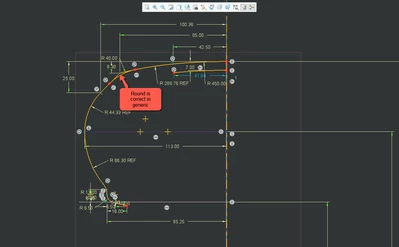
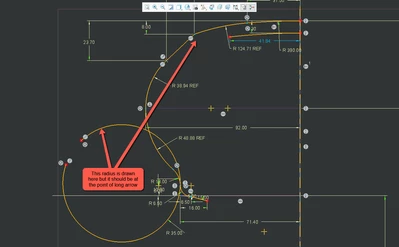
generic.png

instance.png

3 replies

KenFarley
21-Topaz II
January 14, 2021

Presumably, you are going to use this sketch in a protrusion or some such feature. When I do similar things I approach the fillets (rounds) in the shape two ways:

(1) Don't include them in the sketch, just define the geometric entities that lay out the outer shape with sharp corners, etc. Then, add the rounds as a separate feature on the protrusion, revolve, etc. This is pretty robust, usually only fails if I've input a ridiculous value for the round radius.

(2) Sketch the simple geometry described in (1), and add the rounds as tangent circles, not trimmed, just a radius dimension and two tangencies. When defining the feature(s) that use the sketch, the fillet in the sketch uses the radius of the sketched circle in your "sketch feature".


The trouble lies in the unreliable fashion in which Creo positions these tangent arcs. It's a combination of it picking the wrong side of the four quadrants of the crossing entities or "picking" the wrong half of the tangent arc to "keep". It looks like you are suffering a combination of both problems.


Something I've learned, very much the hard way, is it's infinitely better to define complicated geometry using multiple simple sketches rather than trying to define the whole thing in one sketch. I've had sketches with a lot of arcs and fillets, etc. become complete garbage when I've done something I thought was minor, like changing one of the fillet radii. That, or I get the dreaded and unfixable "Sketch has become unstable" error.

tbraxton
22-Sapphire II
January 14, 2021

Ken has provided valid input and that is an option to deal with this by breaking it down and/or removing fillets from the sketch. 


It looks like your sketch is not constrained to regenerate properly with the variations applied in the instance. If you manually  "flex" your sketch in the generic model by setting the limit dimensions do you see the same issue?


If you want to use this sketch as shown you should try to use construction geometry/constraints in the generic sketch that maintain design intent when the dims are flexed to the low/high limits manually. If you post the saved generic sketch that would allow for root cause analysis.

4-Participant
January 14, 2021

Hello again,

Thank you very much for your comments.

I applied Ken's solution that is giving that radius in an another sketched and solved the problem.

instance_new.png

But I have another problem. I am using parameters and family table to create branding charts. I wrote text in sketches and by using parameters and family table I created instances for different brandings. Text looks fine in generic but in instance texts overlap like in below pictures. The text of instance is placed at the wrong side of referenced ":"  . How can I prevent this. Thank you.

text_generic.png

text_instance.png

text_generic2.png

text_instance_1.png

tbraxton
22-Sapphire II
January 15, 2021

Create construction geometry in the sketch that controls the sketch origin for each text string as you require it. Create the sketched text referencing these origins and then flex the sketch manually by changing the values to be used in family table instances.


If this does not work, post the sketch containing the text strings.

1-Visitor
January 18, 2021

Thanks for sharing this information.