
1-Visitor
August 1, 2022
Solved

Get boarders/edges of Text field in Creo Parametric

  • August 1, 2022
  • 2 replies
  • 8705 views

Hello,


I am about to create a parametric model with the geometry relying on text fields that change for different parts of a family. For this I need to either know the dimensions of a text field (height and width) or have the possibility to get points (for changing text fields) on the boarder/edge of the text field. Is there a way to do this? As of what I currently see there is only a way to set/get either the height OR the width (which is the line which the text field is aligned to).


The blue circled area on the screenshot shows an example text field where I want to grab a point or a measurement on the outer line surrounding the text (The text is aligned to a vertical line on the left.).
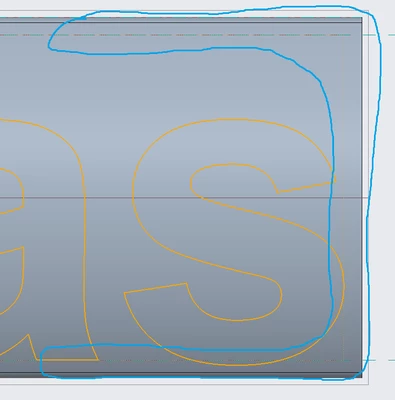
 

PointOnThisLinePease.png


I'm happy for any help!


Regards,
Lukas

Best answer by tbraxton

This video details how to add the reference dimension to sketched text. It is not obvious and I do not think it is documented in the help files.


2 replies

23-Emerald IV
August 1, 2022

Are you hoping to adjust the text to fit in the available space, or adjust the geometry to be larger than the resulting text?

1-Visitor
August 1, 2022

Hello TomU,


the text size is fixed and set by its height I set in advance. I now want to get the width/length of the text field OR set a point on the right side of the text box, when the text field ends. This should work generalized; so when the text (in the same sketch) changes via another parameter input the length/point on the right edge shall update,

23-Emerald IV
August 2, 2022

Very nice!

  1. Due to how Creo regenerates features, I would suggest placing the bounding box relations inside the bounding box feature itself, instead of at the part level.
  2. I wasn't sure if he needed to know the height of the last character separately from the entire string. If so, a more complicated approach is going to be needed...
tbraxton
22-Sapphire II
22-Sapphire II
August 2, 2022

@TomU ,


Is your suggestion regarding when to use feature relations a general statement about best practices for relations?

Or

In the context of the demo part I posted, do you see potential to have the relations for the bounding box to return different results (or undesired model behavior) as part relations vs feature relations? 

1-Visitor
August 2, 2022

Hello tbraxton,


Yes, this is exactly one way how my problem in theory could be solved! I now just struggle with two things:

1. How do you even get a horizontal dimension (that I can then convert to reference) of that text box? I am not able to click the box boundaries or set a measurement there.

2. The coordinate feature is grayed out in my model; how can I change that?


Thanks a lot so far!

24-Ruby III
August 2, 2022

@LL_7636801 wrote:

Hello tbraxton,


Yes, this is exactly one way how my problem in theory could be solved! I now just struggle with two things:

1. How do you even get a horizontal dimension (that I can then convert to reference) of that text box? I am not able to click the box boundaries or set a measurement there.

2. The coordinate feature is grayed out in my model; how can I change that?


Thanks a lot so far!


Hi,

if you want measure the distance between the end of text and box, then you can add geometrical point into Sketch 1 feature.

See modified model.

MartinHanak_0-1659425611858.png