
1-Visitor
July 10, 2012
Question

Graphical error in appearance manager

  • July 10, 2012
  • 2 replies
  • 3968 views

I get this strange graphical error in my appearance manager. Does anybody have any clue?
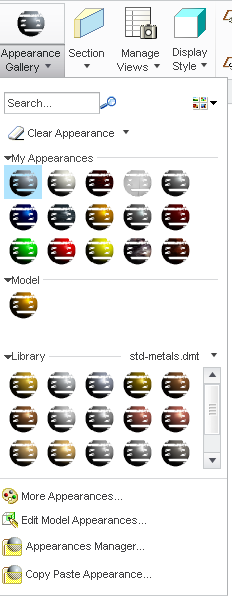
colors_error_in_graphics.png


This thread is inactive and closed by the PTC Community Management Team. If you would like to provide a reply and re-open this thread, please notify the moderator and reference the thread. You may also use "Start a topic" button to ask a new question. Please be sure to include what version of the PTC product you are using so another community member knowledgeable about your version may be able to assist.

2 replies

1-Visitor
July 10, 2012

I've posted about this before but cannot find it.

It's a Win 7 issue. What version and datecode are you using? This doesn't affect performance, it just looks crummy.

DareDevil1-VisitorAuthor
1-Visitor
July 11, 2012

Sorry, I couldn't find it either. Anyway tanks for the pointer. To day I am running Creo Elements 5.0 M120 but I am trying out Creo Parametric 2.0 and I get the same crummy error. As you said, It doesn't affect performance, and some times it doesn't appear at all, but when it dose, it looks cheap...

I run Windows 7 Enterprise with SP1

1-Visitor
July 11, 2012

Hi Daniel

Are you using a certified graphic driver?

You can also try to start Creo in different compatibility mode in win 7.

Regards

Johannes

DomenicLaritz
17-Peridot
July 11, 2012

Maybe it helps, if you change the display style to a non-aero style.