
4-Participant
October 8, 2014
Question

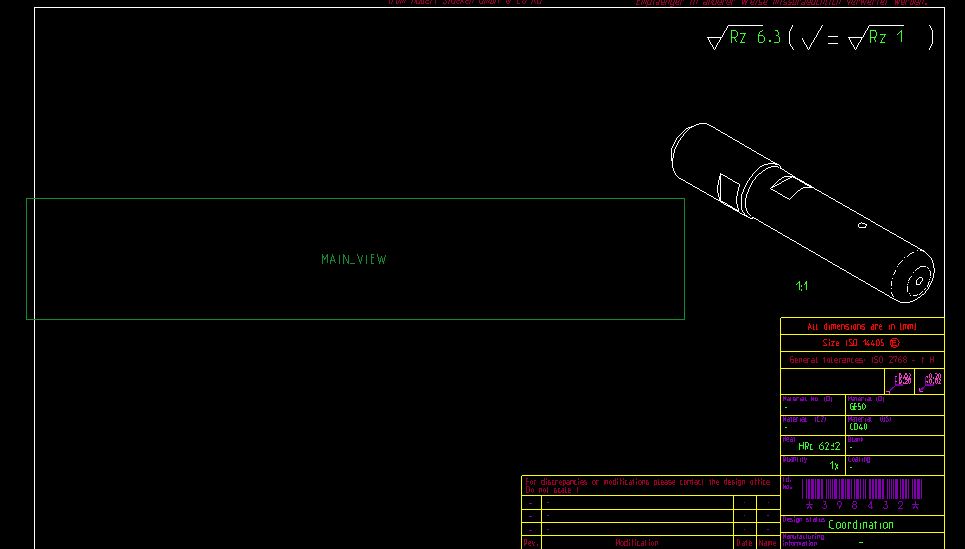
Green box in drawing in place of the actual view of the model.

  • October 8, 2014
  • 2 replies
  • 4222 views

Has anyone had this show up in a drawing? I don't know what happened to my detailed view and I can't even select the green box to do anything with it.
Capture.JPG


This thread is inactive and closed by the PTC Community Management Team. If you would like to provide a reply and re-open this thread, please notify the moderator and reference the thread. You may also use "Start a topic" button to ask a new question. Please be sure to include what version of the PTC product you are using so another community member knowledgeable about your version may be able to assist.

2 replies

1-Visitor
October 8, 2014

It looks like you erased the view called "MAIN_VIEW" - you can confirm this if in the Drawing Tree, the view name has an icon that is grayed-out.

If that's the case, you can resume it right-clicking its entry the Drawing Tree list and selecting "Resume View".

Or, switch to the Layout tab, then in the "Display" section, select "Resume View".

Milkman4-ParticipantAuthor
4-Participant
October 9, 2014

"Resume View" is not an option. Delete is my only option from here.

Mahesh_Sharma
22-Sapphire I
October 8, 2014

As Paul mentioned view which is in green (Main_view) is an erased view. To display this view, you need to resume the view using Layout Tab > Select View > Resume View or simply select the view name in drawing tree > RMB > Resume view.

Erase view functionality is basically to increase the performance when working with large drawings.

View.png

Milkman4-ParticipantAuthor
4-Participant
October 9, 2014

"Resume View" is not an option. Delete is my only option from here.

17-Peridot
October 9, 2014

Your view might be missing a reference. Review the view properties and see if something is missing.

This is an unusual case since resume doesn't work.