
17-Peridot
May 6, 2014
Solved

Hidden lines during orientation

  • May 6, 2014
  • 3 replies
  • 1701 views

Is there a way to render the hidden lines "hidden" during the orientation?
I explain better...
During the orientation (roller of the mause), if my view style is "no hidden", you see equally the hidden lines, and they return to not be seen when you've stopped the orientation.

I don't want to see hidden lines during orientation.

Is there an option or something like this?
Bye


This thread is inactive and closed by the PTC Community Management Team. If you would like to provide a reply and re-open this thread, please notify the moderator and reference the thread. You may also use "Start a topic" button to ask a new question. Please be sure to include what version of the PTC product you are using so another community member knowledgeable about your version may be able to assist.
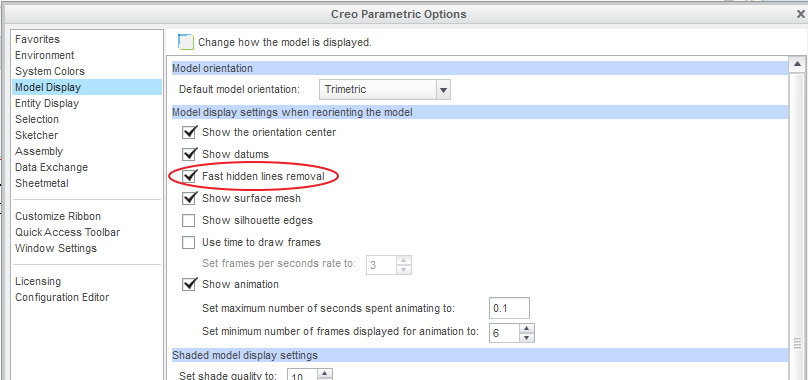
Best answer by neomechanikos

Yep, place a check mark on the following option and the hidden lines will stay hidden during orientation of a model in "no hidden" display style. I don't think this is hardware dependent either so it should work with non-professional video cards too.

hidden_line_removal.jpg

Edit:

The above is for Creo 2.0.

"fasthlr yes" in your config.pro will accomplish the same thing.

3 replies

17-Peridot
May 6, 2014

Hidden line removal is a serious CPU workout. For efficiency, it goes to wireframe and once stopped, it can calculate the hidden line removal again. The same goes for silhouette edges.

The use of shaded surfaces is actually easier on the system. This is the most efficient way to manipulate the model orientation.

1-Visitor
May 6, 2014

Yep, place a check mark on the following option and the hidden lines will stay hidden during orientation of a model in "no hidden" display style. I don't think this is hardware dependent either so it should work with non-professional video cards too.

hidden_line_removal.jpg

Edit:

The above is for Creo 2.0.

"fasthlr yes" in your config.pro will accomplish the same thing.

gfraulini17-PeridotAuthor
17-Peridot
May 7, 2014

Thanks Erik!


I found the same option you've mentioned for Creo 2 in WF5 that I use.

Like you, I also think this option is not hardware dependent; but this thought is supported only by the fact I don't see any type of slowdown and increment of CPU work in the task manager.

The name of the option for WF5 is: "fasthlr"

Cattura.JPG