
10-Marble
February 27, 2026
Question

Hidden lines for quilts are still showing in drawing specifically when section views are enabled.

  • February 27, 2026
  • 2 replies
  • 84 views

This problem has really been frustrating me for quite some time...

When I create a drawing and insert a view then select the display style to be "no hidden" it usually hides all the hidden lines no problem.
But when I enable a section view that is when a whole world of problems occurs.
Certain objects don't seem to obey the hidden lines, and they still show all their lines. Specifically it seems to be quilts or something that is having this problem because it only the objects in pink/purple lines that have the problem. I just find it so strange that this only happens with section views.

Anyway, I tried editing the section itself by checking off the "Include quilts" option, but that just removed the components entirely rather than just removing the hidden lines.

Someone please help me figure out what is going on here.

I've attached a photo of the problem. It shows my layout with the section view enabled. you'll notice there are cabinets that are pink which are showing all their internal components rather than just their front faces like the white cabinets are. I mean even the one cabinet on the left has some sort of fan that is showing up in purple even though that fan is inside it. And there are other components in purple towards the right and even an entire care is showing in the bottom which should not be visible because it's behind an entire wall...
These pink/purple components are the problem here, I still want them showing, I just want them to obey the 'hidden lines' feature much like every other component is.
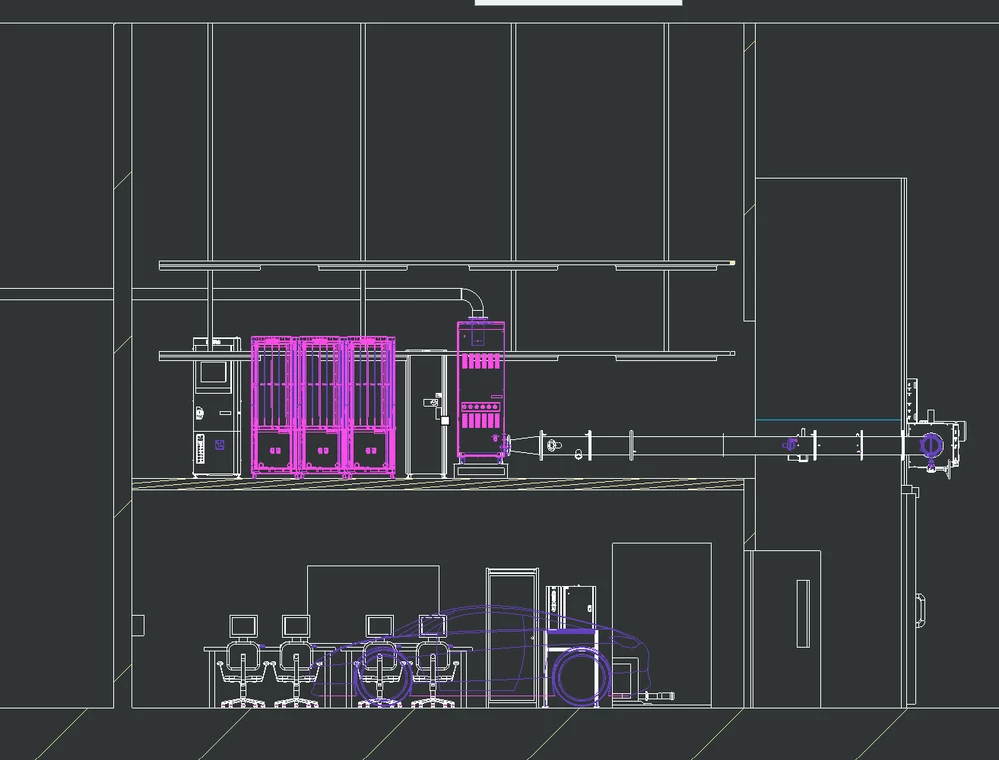
Screenshot.png

2 replies

21-Topaz II
February 28, 2026
Dodge10-MarbleAuthor
10-Marble
March 2, 2026

So far that other thread has been no help, because their problem was solved by setting their Drawing View display to have Hidden Line Removal For Quilts set to Yes
I've already got my Drawing View display set to have Hidden Line Removal For Quilts set to Yes.
And my Config.Pro has HLR for quilts set to Yes...

Yet still no luck

That Creo Documentation was helpful though, it brought up the .dtl setting within my drawing properties that is called "show_quilts_in_total_xsecs" and says it should be set to Yes, but by default it is set to No for me. My company has this section locked so I'm unable to change it to yes. However, my co-workers have this setting set to No as well, yet I'm the only person with this issue... this discredits the idea that this setting is what's causing m issue, therefore I cannot justify overriding this setting.

It's also worth noting that that Creo documentation brought to my attention that when modifying the section view within the model and checking the box to "Include quilts"... it says this fix is only compatible with versions of creo that are versions 8 or later. I have Version 7.0.3.0 which may explain why when I check this box, it just hides all the quilted objects entirely rather than only hiding their hidden lines.
However, once again, I'm unable to update because my work has this restricted as well.

23-Emerald III
March 2, 2026

If I switch "show_quilts_total_xsecs", it will show the surface mode. as expected, that is after I set the "include quilts" within the section view creation.


19-Tanzanite
March 2, 2026

Without having the model, hard to say what's going on.  Maybe some solid bodies in your model are "interfering" with the quilt objects and the algorithm is just confused.

I'd check the effect of this option fasthlr_drawing


there are also options:

hlr_adv_interference_check_asm

hlr_adv_interference_check_prt


but not sure if those apply for Creo 7.